

Why Should Companies Outsource IT Support?
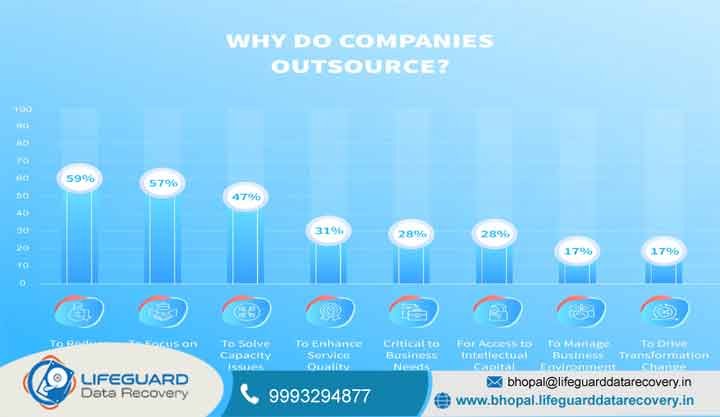
Technology is the backbone of modern businesses across Bhopal, Madhya Pradesh. Offices, hospitals, schools, retailers, and industrial units depend on reliable networks, servers, computers, and data systems every day. Why should companies outsource IT support? However, maintaining a complete in-house IT department can be expensive. Salaries, training, software, security tools, and hardware costs can quickly increase operating expenses. At the same time, unexpected server failures, cyberattacks, and data loss can cause serious downtime.
For this reason, many businesses are turning to outsourced IT support. A professional provider can monitor systems, manage networks, strengthen cybersecurity, maintain servers, and respond to technical problems. In addition, businesses can access specialist expertise without building a large internal IT team. Lifeguard Data Recovery provides IT support and data recovery solutions for businesses in Bhopal and across Madhya Pradesh. Our services help organizations protect critical information, respond to storage failures, and maintain business continuity.
What Is Outsourced IT Support and How Does It Work?
Outsourced IT support means hiring an external technology provider to manage specific IT tasks or an entire business IT environment. Depending on the company’s needs, support can be fully outsourced or co-managed with an existing internal IT team. A provider may handle help desk support, server maintenance, network management, cybersecurity, cloud services, backups, and disaster recovery. Furthermore, remote monitoring can identify potential problems before they cause major downtime.
This approach gives businesses access to multiple IT specialists. Instead of depending on one general IT employee, companies can work with professionals who have experience in networking, servers, cybersecurity, cloud systems, and data recovery.
Why Businesses in Bhopal Need Outsourced IT Support
Businesses in Bhopal face many of the same technology challenges as larger organizations. However, smaller companies may not have the budget to employ dedicated specialists for every IT function. Power fluctuations, aging hardware, storage failures, network problems, and cybersecurity threats can also disrupt operations. Consequently, businesses need reliable IT support that can respond quickly when problems occur.
Outsourcing provides access to professional expertise without the expense of maintaining a large internal department. It can also give companies greater flexibility as their technology requirements change.
Top 10 Reasons Companies Outsource IT Support
1. Reduce IT Costs and Improve Budget Control
Maintaining an in-house IT team involves salaries, benefits, training, software, and equipment costs. These expenses can become difficult to manage as a business grows. Outsourced IT support provides a more predictable cost structure. Therefore, companies can receive professional technical assistance without hiring several full-time specialists.
2. Strengthen Cybersecurity
Cyber threats now include ransomware, phishing, malware, and data breaches. Protecting business systems requires continuous monitoring and regular security updates. An experienced IT provider can implement endpoint protection, firewall management, patching, access controls, and security monitoring. As a result, businesses can reduce their exposure to common cyber risks.
3. Improve Business Continuity and Data Protection
Hardware failure, accidental deletion, ransomware, and server crashes can cause significant data loss. Therefore, IT support should include reliable backup and disaster recovery planning. Professional recovery specialists can also assist when conventional backups are unavailable. This is particularly important for failed hard drives, RAID systems, NAS devices, servers, and other business storage systems.
4. Move From Break-Fix to Proactive IT
Traditional IT support often starts after something breaks. This reactive approach can lead to unnecessary downtime. Instead, managed IT services use proactive monitoring. Technicians can identify storage problems, network performance issues, software errors, and other warning signs before they become major failures.
5. Free Internal Teams to Focus on Business Growth
Employees should spend their time serving customers and growing the business rather than troubleshooting computers or resetting passwords. By outsourcing routine IT tasks, companies can allow their employees to focus on sales, operations, customer service, and strategic projects.
6. Access Certified IT Specialists
Modern IT environments can involve cloud platforms, cybersecurity, virtualization, servers, networks, and databases. One employee may not have expertise in every area. An outsourced provider gives businesses access to a broader team of technical specialists. Moreover, companies can obtain expert assistance for complex projects without hiring permanent specialists.
7. Scale IT Support as the Business Grows
Business growth often means adding employees, offices, devices, applications, and cloud services. Consequently, IT requirements can change quickly. Outsourced IT support can scale with the organization. Providers can help deploy new computers, configure networks, support remote employees, and expand cloud infrastructure as needed.
8. Improve Service Quality With SLAs
A professional IT provider can establish Service Level Agreements (SLAs). These agreements define response times, support responsibilities, and service expectations. Therefore, businesses gain greater accountability and a clearer understanding of how technical issues will be handled.
9. Support Compliance and Data Governance
Businesses often manage sensitive customer, financial, employee, and operational information. Proper access controls, backups, security policies, and data management are therefore essential. An experienced IT partner can help organizations establish stronger data protection and governance practices.
10. Gain a Competitive Advantage
Reliable technology helps businesses operate efficiently. However, frequent network problems, slow systems, and data loss can put companies at a disadvantage. Outsourced IT support helps businesses maintain dependable infrastructure. Ultimately, this can improve productivity, customer service, and operational efficiency.
What IT Services Can Be Outsourced?

Help Desk and Remote IT Support
Help desk services handle everyday technical problems. These may include software errors, email issues, password problems, printer failures, and workstation troubleshooting. Remote support can resolve many issues quickly. When physical intervention is necessary, on-site assistance can provide additional support.
Server Maintenance and Network Management
Servers store important business applications, databases, and shared files. Regular maintenance helps reduce the risk of unexpected failures. Network management can include router, switch, firewall, Wi-Fi, and connectivity monitoring. Therefore, businesses can maintain a more stable and secure IT environment.
Cloud Computing and Data Storage
Cloud services allow employees to access business systems and files from different locations. Outsourced IT specialists can assist with cloud migration, storage configuration, access management, and backup strategies. In addition, hybrid cloud solutions can combine local infrastructure with cloud-based storage and recovery.
Backup, Disaster Recovery, and Emergency Data Recovery
Backups are essential, but they cannot prevent every form of data loss. Storage devices can fail, files can be deleted, and RAID systems can become inaccessible. Lifeguard Data Recovery provides professional data recovery services for hard drives, SSDs, RAID systems, NAS devices, servers, and other storage media. These services can help businesses recover critical information after serious storage failures.
How to Choose an Outsourced IT Support Company in Madhya Pradesh
Choosing an IT partner requires more than comparing monthly prices. First, evaluate the provider’s technical expertise, response times, service coverage, and support model. Next, check whether the provider can support both routine IT issues and complex infrastructure problems. Clear SLAs are also important because they establish service expectations before an emergency occurs. finally, consider whether the company has access to specialized data recovery capabilities. If a server, RAID array, or business storage device fails, having recovery specialists available can significantly reduce the risk of permanent data loss.
Common IT and Data Loss Problems We Handle
Server Failure and Business Downtime
A failed business server can prevent employees from accessing databases, applications, and shared files. Professional server recovery can help diagnose storage and hardware problems and restore critical information.
Lost CCTV Footage
Businesses depend on CCTV systems for security and incident investigations. Deleted, corrupted, or inaccessible footage can create serious problems. Professional CCTV and DVR/NVR recovery can help recover important video files from damaged or failed storage devices.
Corrupted Video Files
Media professionals can lose large amounts of valuable footage after memory card errors, storage failures, or file corruption. Specialized recovery techniques can help retrieve damaged video files and other important media assets.
Lost Photos and Personal Files
Data loss also affects individuals. Failed laptops, external drives, memory cards, and accidental deletion can put personal photos and documents at risk. Professional recovery services can help determine whether lost files can be safely recovered.
Frequently Asked Questions About Outsourced IT Support
Can outsourced IT teams work with existing in-house IT staff?
Yes. Outsourced IT providers can work alongside an existing internal IT department through a co-managed IT support model. In this arrangement, your internal employees can continue handling everyday user requests, while the external IT team manages more complex responsibilities. For example, an outsourced provider can assist with server maintenance, network management, cybersecurity, cloud migration, system monitoring, backups, and disaster recovery. In addition, the external team can provide after-hours support when your internal staff is unavailable.
How quickly can an outsourced provider respond to a critical server failure?
Response times depend on the provider, service agreement, location, and severity of the incident. Businesses should review the provider’s Service Level Agreement (SLA) before starting a support contract. A strong outsourced IT provider should have a clear process for handling critical incidents. First, technicians can perform remote diagnostics to identify the cause of the server failure. Next, they can determine whether the problem involves software, networking, storage, hardware, or another component.
What is the difference between standard IT support and disaster recovery?
Standard IT support focuses mainly on maintaining and troubleshooting everyday technology. This may include computer problems, software errors, network connectivity, email issues, printer problems, user accounts, and routine system maintenance. Disaster recovery has a different purpose. It focuses on restoring critical systems and data after serious incidents. These incidents may include server crashes, ransomware attacks, accidental deletion, hardware failure, RAID corruption, or major storage damage.
What should I do if my business hard drive or server fails?
If a business hard drive or server suddenly fails, avoid continuing to use the affected device unnecessarily. Repeated restarts, prolonged operation, or inappropriate recovery attempts can sometimes make a physical storage problem worse. First, document any error messages or unusual sounds you noticed. Then, if possible, shut down the affected system safely. Avoid opening a hard drive or replacing internal components without the proper equipment and expertise.
Are company files kept confidential during data recovery?
Professional data recovery providers should follow strict procedures for handling sensitive business information. This is especially important when recovering customer records, financial documents, employee information, databases, intellectual property, or confidential project files. Before submitting a storage device, businesses should ask about data privacy, access controls, confidentiality agreements, and secure handling procedures. They should also confirm who can access recovered files during the recovery process.
What devices can be recovered?
Professional data recovery services may support a wide range of storage devices. These can include traditional hard disk drives, external hard drives, SSDs, NVMe drives, USB flash drives, memory cards, NAS devices, servers, and RAID systems. Recovery requirements can vary significantly between devices. For example, a deleted file from a healthy hard drive may require a different approach from a physically damaged enterprise SSD.
Can you recover data from failed RAID or server systems?
Yes, professional data recovery specialists can often work with failed RAID arrays, NAS systems, and business servers. However, successful recovery depends on the condition of the drives and the nature of the failure. RAID systems can become inaccessible because of failed disks, controller problems, configuration errors, file-system corruption, accidental reconfiguration, or multiple drive failures. In such cases, rebuilding the array without proper analysis may create additional problems.
A professional recovery process typically begins with an assessment of the individual storage devices. The recovery team can then determine the appropriate method for reconstructing the available data while minimizing further risk.
How is data recovery pricing determined?
Data recovery pricing depends on several factors. These can include the type of storage device, storage capacity, failure type, physical condition, level of corruption, recovery complexity, and equipment required. For example, recovering deleted files from a healthy drive may be less complex than recovering information from a physically damaged hard drive. Similarly, RAID, server, SSD, and chip-level recovery cases can require specialized techniques and equipment.
Can deleted files always be recovered?
No. Deleted files cannot always be recovered successfully. The possibility of recovery depends on several factors, including whether new data has overwritten the deleted information. For this reason, stop using the affected storage device as soon as you discover important files are missing. Avoid copying new files to the drive, formatting it, or running unnecessary repair utilities.
What happens if my hard drive is making clicking or grinding sounds?
Clicking, grinding, buzzing, or repeated spin-up and spin-down behavior can indicate a serious mechanical or physical problem. Continuing to operate such a drive may increase the risk of additional damage. Do not repeatedly restart the drive to see whether it begins working again. Also, avoid opening the drive outside a properly controlled recovery environment.
Do you offer a no-data, no-fee policy?
Lifeguard Data Recovery can explain its current No Data, No Fee terms during the evaluation process. Businesses should confirm the applicable conditions before authorizing recovery work. The evaluation can help determine the likely cause of failure, the recovery approach, and whether the required files appear recoverable. Clear communication at this stage helps businesses make an informed decision before proceeding.
How long does data recovery take?
Data recovery timelines vary depending on the device and type of failure. A straightforward logical recovery may be completed relatively quickly, while physically damaged drives and complex enterprise storage systems can require considerably more time. For example, RAID recovery may involve analyzing multiple drives and reconstructing the original storage structure. Likewise, physically damaged hard drives may require specialized laboratory procedures before data extraction can begin.
Why should businesses choose professional data recovery instead of DIY software?
DIY recovery software can be useful in certain simple logical data-loss situations. However, it is not appropriate for every failure. Using recovery software on a physically failing drive can place additional stress on the storage media. Professional recovery specialists have access to specialized equipment, diagnostic tools, controlled environments, and technical recovery procedures. These resources become particularly important when dealing with failed hard drives, SSDs, RAID arrays, servers, or other complex storage systems.
Can outsourced IT support help prevent data loss?
Yes. A well-managed IT support strategy can reduce the risk of many common data-loss incidents. Regular backups, system monitoring, security updates, access controls, storage health checks, and disaster recovery planning can all improve business resilience. However, prevention does not eliminate every risk. Hardware can fail unexpectedly, employees can accidentally delete files, and ransomware can compromise systems.
What should a business look for in an outsourced IT support provider?
Businesses should consider several factors before choosing an outsourced IT support company. First, review the provider’s technical experience and the range of services available. Next, check response times, support availability, SLA terms, cybersecurity capabilities, backup services, and on-site coverage. It is also useful to determine whether the provider can support your current infrastructure as the company grows.
For businesses that depend heavily on critical data, data recovery expertise is another important consideration. A provider that can coordinate IT support, backup planning, disaster recovery, and professional data recovery can provide a more comprehensive technology support strategy.
Can outsourced IT support reduce business downtime?
Yes. Proactive IT monitoring and regular maintenance can help identify problems before they become major failures. In addition, faster technical response can reduce the amount of time employees remain unable to access essential systems. For example, monitoring can identify storage health issues, network performance problems, software failures, or unusual system activity. Technicians can then investigate the problem before it causes a complete outage.
Although no provider can guarantee that downtime will never occur, proactive management can help businesses reduce avoidable interruptions and recover more efficiently when incidents happen.
Does Lifeguard Data Recovery provide IT and data recovery support in Bhopal?
Lifeguard Data Recovery provides professional data recovery services for businesses and individuals in Bhopal, Madhya Pradesh. The company supports recovery requirements involving hard drives, SSDs, RAID systems, servers, external drives, and other storage media. Businesses can contact the Bhopal team to discuss storage failures, deleted files, server problems, or other data-loss situations. For urgent cases, it is recommended to contact the recovery team before attempting further troubleshooting on the affected device.
Secure Your Business Infrastructure With Lifeguard Data Recovery
Reliable IT support helps businesses reduce downtime, protect critical information, and maintain productivity. However, technical support alone may not be enough when serious storage failures occur. Lifeguard Data Recovery combines business IT support capabilities with professional data recovery expertise for organizations in Bhopal and across Madhya Pradesh.
Therefore, businesses can prepare for everyday technical problems while also having access to specialized recovery assistance when critical storage systems fail. Need help with your business IT infrastructure or data loss? Contact Lifeguard Data Recovery in Bhopal at 9993294877 for professional assistance.