

difference between HDD SSD NVMe
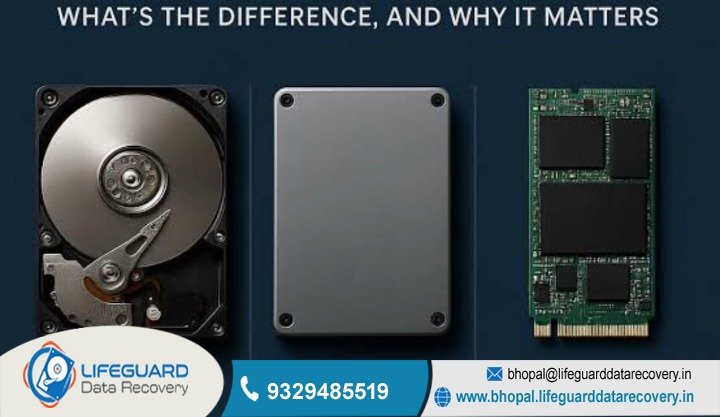
So, you’re looking to upgrade your office computers or maybe your home setup, but you’re stuck on which drive to pick? It’s a common headache. Choosing between an HDD, SSD, or NV Me isn’t just about the price tag; it’s about making sure your work doesn’t come to a grinding halt right when you’re busy.
At Lifeguard, we help Bhopal businesses figure out the actual difference between HDD SSD NV Me so they can stop dealing with lag and start working with maximum efficiency.
Why Choose Lifeguard for System Optimization
When a business workstation starts acting up-taking forever to boot or freezing when you open a simple Excel sheet-the bottleneck is almost always the storage drive. Getting a clear HDD vs SSD vs NV Me performance comparison is honestly vital for any office manager who wants to keep their team productive.
At Lifeguard, we don’t just throw parts at a problem. We look at your specific workflow. Are you running a busy retail shop in MP Nagar? Or maybe a professional consultancy in Arera Colony? Our engineers do a proper technical audit to ensure your chosen SSD vs NV Me vs HDD storage types are actually compatible with your current hardware. We focus on long-term stability, not just a quick fix.
Deep Diagnostic vs. Surface Cleaning
Most generic repair shops will just tell you to “format the drive.” While that might help for a week, it doesn’t fix a hardware limitation. Our diagnostic process looks at the actual physical health of your disk’s platters or the wear-and-tear on your flash cells. We provide a clear roadmap so you understand exactly how a new drive will prevent things like future laptop failure or a scary disk crash.
Professional NV Me vs. SSD Speed Difference for Bhopal Businesses
For companies in Bhopal dealing with high-resolution video or massive databases, the NV Me vs SSD speed difference is a total game-changer. Even though a standard SATA SSD is much faster than an old hard drive, it is still capped by an older connection interface.
Moving to NV Me technology allows your data to travel directly over the PCIe lanes. In simple terms? It can be up to ten times faster than a traditional SSD. This NV Me vs SSD speed difference means your employees spend less time staring at a loading bar and more time finishing projects. At our Bhopal lab, we see so many professionals frustrated by “pc lagging,” and usually, an NV Me upgrade is the “magic” fix that eliminates those bottlenecks for good.
Support for SSD vs. HDD vs. NV Me for Laptop and Data Security
When it comes to portable workstations, choosing an SSD vs HDD vs NV Me for laptop use is about more than just speed it’s about physical safety. Traditional HDDs have moving parts inside that spin really fast. If you bump your laptop while traveling, those parts can break. Upgrading to a solid-state option ensures your business data stays safe even if your device takes a bit of a physical hit during a commute.
Furthermore, the SSD vs HDD vs NV Me for laptop decision impacts your battery life. SSDs and NV Me drives don’t have motors, so they use significantly less power. This also means they generate less heat, which is a huge plus in the hot climate of Madhya Pradesh. Keeping your laptop cool helps prevent motherboard issues and overall hardware failure.
Data Recovery & System Stabilization
Because our main expertise is in the recovery lab, we protect your info while we perform your storage upgrade. We make sure your deleted data is not overwritten during the move. If your system was hanging because of a failing HDD, we can perform a secure recovery of your files before the hardware dies completely.
Difference Between HDD SSD NV Me: Why Is My Storage Slow?
Understanding the difference between HDD SSD NV Me is the first step toward a more reliable office. A question we get all the time is, “what is the difference between HDD SSD and NV Me in terms of daily use?”
Think of it like this:
-
HDD: A record player. It has to move a physical arm to find music. Slow and fragile.
-
SATA SSD: A digital MP3 player. It’s electronic and fast, but it uses an old-style “cable” connection.
-
NV Me: A high-speed fiber-optic connection. It’s the ultra-high-speed modern standard.
SSD vs. HDD Difference and Registry Errors
A mechanical drive can take a long time to read tiny system files, which is a primary SSD vs HDD difference you’ll notice every time you turn the computer on. When your system has to wait for an HDD to find data, it makes the whole computer feel like it’s stuck in sand. We help you migrate to solid-state storage to speed up that communication.
HDD vs. SSD Pros and Cons
While HDDs offer much more storage for the price, they are loud, slow, and prone to mechanical failure. The HDD vs SSD pros and cons clearly favor SSDs for performance, though HDDs remain useful for long-term backups. We help you balance these factors to create a storage setup that is both fast and cost-effective Optimizing a Bhopal Media House
The Scenario: A busy media production house in Bhopal was facing severe “pc lagging” while editing documentaries. Their systems were using old HDDs, and they were constantly losing time to “Not Responding” errors.
The Solution: Lifeguard performed a full hardware audit. We recommended a NV Me vs SATA SSD difference analysis and showed them that their motherboards could handle the newer tech. We migrated their active editing bays to the WD Black SN850X, while keeping large HDDs for their raw footage archives.
The Result: The firm saw a 300% increase in file export speeds. By addressing the specific difference between NV Me and SSD storage needs, we saved them from having to buy entirely new computers.
FAQs: Expert Storage Troubleshooting
What is the fastest computer hanging problem solution for Windows 11?
The quickest way to fix a freeze is usually to clear out your “temp” files and turn off high-impact apps in the Task Manager. But, if it keeps happening, it usually means there’s a deeper problem with your hardware or files. Lifeguard can do a professional scan to find and fix those hidden errors for good.
Is there a reliable laptop freezing frequently fix that doesn’t delete my data?
Yes, for sure. Most freezing is actually a software problem and can be fixed without touching your photos or files. We always put data safety first and can do a laptop freezing frequently fix that fixes the OS errors while keeping your data 100% safe. We always suggest doing a full backup before starting any big repairs, though.
What are the most common system hanging reasons and solutions for 2026?
In 2026, we’re seeing a lot of hangs caused by background updates that don’t match or high-quality web videos. Modern system hanging reasons and solutions often mean you might need to upgrade to an SSD or add more RAM so you can handle the newer, heavier apps. Keeping your software clean is the best way to avoid this.
How does your laptop hanging problem solution differ from home remedies?
Home fixes are usually just “guessing,” but our laptop hanging problem solution uses professional tools to check things like voltage and heat levels. We can see if a specific tiny chip on the board is failing-something a simple software reset would never find. This scientific way of working means we have a much better chance of fixing it right.
Can you provide a pc hanging issue fix for older hardware?
Absolutely! Older computers actually get the most benefit from a professional clean and optimization. We can provide a pc hanging issue fix that makes a 5-year-old machine feel almost as fast as the day you first brought it home. It’s a very cheap way to avoid buying a whole new computer.
What is the best pc lagging problem solution for a gaming computer?
Gaming lag is often caused by heat or old graphics drivers. Our pc lagging problem solution for gamers includes checking if your system is stable and upgrading your cooling so you can play for hours without issues. We make sure your PC stays fast even when it’s working really hard.
Is an NV Me vs SSD vs HDD comparison necessary for a small home office?
Yes, because your choice affects how much work you get done and how safe your data is. A NVMe vs SSD vs HDD comparison shows that even though an HDD is cheap, its higher chance of breaking could cost you more if you lose your files. We usually suggest at least a basic SSD for reliability.
What is the main SSD vs HDD difference for a basic office computer?
The most noticeable change is boot time. An SSD makes a computer feel much “snappier” because it can access data instantly. For a Bhopal office, this means less time waiting and more time working.
Why is there such a big NV Me vs SSD speed difference in price?
It comes down to the quality of the controller and the flash cells. While a SATA SSD like the PNY CS900 is fine for basic typing, the NVMe vs SSD speed difference is worth it for heavy data work or video editing.
Which is better HDD SSD or NV Me for storing 10 years of family photos?
For long-term storage where speed doesn’t matter, a high-quality Seagate HDD is the most cost-effective. However, you should always have a backup on an SSD or the cloud for extra safety.
Master the Difference Between HDD SSD NV Me – Schedule Your Upgrade Today
Don’t let outdated storage tech slow down your business. In the competitive Bhopal market, every second your team spends waiting is lost profit. Understanding the difference between HDD SSD NV Me is the first step toward a more professional and efficient office.
Lifeguard Data Recovery is ready to help. Contact our Bhopal office right now to get your systems running at 2026 speeds.
Call Now:9329485519
Visit Website: http://bhopal.lifeguarddatarecovery.in