

how to clean laptop fan without opening
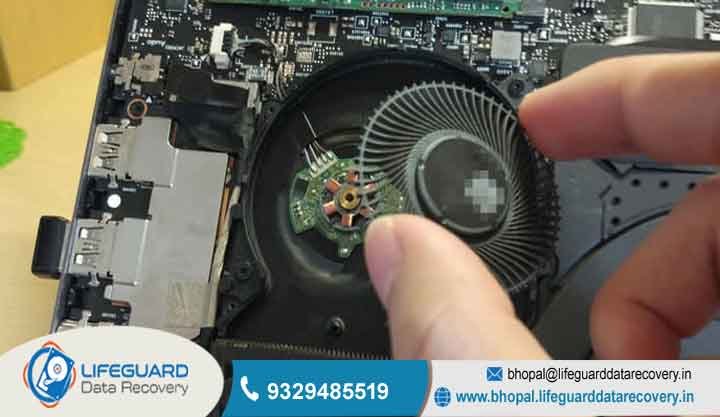
Living in a place like Bhopal, we all know how the dust can be. In our city, those tiny airborne particles are like silent killers for our expensive electronics. If you notice your computer is starting to run a bit slow or feels like it’s burning your lap, learning how to clean a laptop fan without opening the whole thing is your first line of defense.
Whether you are a busy professional or a student working on a project, this is something you should definitely know. Here at Lifeguard Data Recovery, we see every day how a little bit of simple maintenance can stop a total hardware disaster.
Basically, dust acts like a thick blanket or insulator. It traps the heat inside your machine and forces the processors to slow down just to stay alive. But don’t worry, by learning a few easy tricks, you can keep your system running at its best. The best part? You can do this without voiding your warranty or accidentally breaking those tiny, delicate parts inside.
Get a Diagnosis Today
24/7 Support | Secure Lab | Expert Engineers | 100% Confidential
Why a Clean Laptop Fan Without Opening is Vital for Your Device
Heat is really the #1 enemy of computer chips. When you clean the laptop fan without opening the outer case, you are making sure the cooling system can actually push out the hot air like it was designed to do. If the airflow gets blocked by gunk, the temperature inside can reach scary levels. This often leads to permanent motherboard issues that are very expensive to fix.
Have you ever heard of “thermal throttling”? That is just a fancy way of saying your CPU slows itself down so it doesn’t literally melt. This makes your laptop lag like crazy and puts a lot of stress on the circuits. Doing regular maintenance helps you avoid a sudden disk crash. Trust me, you don’t want your drive to fail just because it got too hot for too long.
How to Clean Laptop Fan Dust and Prevent Overheating
To keep your laptop living a long life, you need to understand how it breathes. If you want to know how to clean a laptop fan dust the right way, first look at where the air goes in and out. Most modern laptops suck in cool air from the bottom and blow the hot stuff out the side or the back vents.
Over time, dust builds up and forms something like a “carpet” over the cooling fins. This makes the fan spin much faster and louder, but it doesn’t actually cool anything down. Keeping these paths clear is a must if you want to prevent a total laptop failure. Nobody wants their business or personal work to stop because the computer decided to quit.
Why Choose Lifeguard for Your IT Needs in Bhopal, Madhya Pradesh?
Lifeguard Data Recovery is really the go-to spot for technical help here in central India. We act as a bridge between local help and global high-quality standards for offices and regular folks across Madhya Pradesh. Our shop has a high-tech secure recovery lab that is built to handle even the most “hopeless” hardware problems.
We are known as the No.1 experts in the area because we really care about keeping your data safe and your hardware running for years. Whether you just need a simple cleaning or your whole system has crashed, our engineers have over 15 years of experience. We make sure your digital life stays safe and sound.
Our Specialized Services: Beyond Simple Cleaning
We do a lot more than just maintenance. We have a full range of professional services to keep your tech in top shape:
-
Data Recovery Services: We can get back your deleted data or fix corrupted files from almost any device.
-
CCTV Services: We help with DVR failures and fix surveillance data loss for shops and offices.
-
Laptop & IT Repair Services: We do deep motherboard repairs and make any brand of laptop run faster.
The Safest Ways to Clean Laptop Vents Without Opening the Case
Think of the outside of your laptop as a shield against the world. You should probably clean laptop vents without opening the shell at least once a month, especially if you work in a dusty room or near an open window. You can use a soft brush or a microfiber cloth to wipe away the first layer of dust before it gets sucked deep into the cooling fins.
Before you start cleaning, always make sure the laptop is totally turned off, and the charger is unplugged. Finding the “exhaust” vents is the most important part because that’s where the most dust gets stuck. If you focus your cleaning there, you can lower the heat a lot without even touching a screwdriver.
How to Clean Laptop Cooling Fan Externally Using a Vacuum or Blower
For many of us, the best way to clean a laptop cooling fan externally is by using a small electronic blower. These are much better than hair dryers because they blow cool, focused air that knocks the dust loose. Just point the blower at the intake vents and watch the dust fly out the other side.
This is a great laptop overheating fix without opening the whole machine. If you decide to use a vacuum, just make sure it’s a small, low-power one made for electronics. This helps you avoid “static shock” that can fry your computer. Move the nozzle slowly across the vents to suck out any hair or “dust bunnies” hiding near the fan blades.
How to Clean a Laptop Fan with Compressed Air Safely
A can of “canned air” is probably the most popular way to do this yourself. To clean a laptop fan with compressed air correctly, hold the can straight up and use short bursts of air. Whatever you do, don’t hold the button down for a long time. If the can gets too cold, it might spray liquid into your laptop, and that is a big problem.
A little pro tip: use a thin toothpick to very gently hold the fan blade still through the vent hole while you spray. This stops the fan from spinning too fast, which can sometimes send too much electricity back into the motherboard and damage it. It’s a quick process that keeps everything at a safe temperature.
Professional Laptop Fan Noise Solution Without Opening
If your computer sounds like a jet taking off, you definitely need a laptop fan noise solution without opening the case. Usually, that loud noise is just the fan working way too hard to push air through a wall of dirt. If it’s still noisy after you clean the outside, it might mean the parts inside the fan are starting to wear out after years of use.
Sometimes, just cleaning the surface isn’t enough to fix the mechanical stress. At Lifeguard, we can figure out if it’s just a simple dust issue or if you need a professional part replacement. Fixing a noisy fan early can stop it from quitting entirely, which usually leads to immediate overheating and losing your files.
How Lifeguards Handle Professional Maintenance
When your DIY efforts aren’t quite enough, our pro team follows a solid plan to get your device back to “like new” condition:
-
Non-destructive Analysis: We use special thermal cameras to see exactly where the heat is getting trapped.
-
Specialized Cleaning: In our Recovery Lab, we use high-pressure air and special cleaners to get rid of every single speck of dust.
-
Stress Testing: We push the laptop to work hard to make sure the cooling stays steady, even when you’re doing a lot of work.
Laptop Overheating Fix Without Opening: Pro Tips for Better Airflow
If you’re searching for a laptop overheating fix without opening your computer, take a look at where you are working. Always try to use your laptop on a hard, flat surface like a wooden desk. If you use it on a bed, pillow, or carpet, you are basically choking the intake vents on the bottom. This makes the temperature go up in just a few minutes!
Another trick is “software cleaning.” If you close apps you aren’t using, the processor doesn’t have to work as hard, so it stays cooler. If you combine these small habits with regular vent cleaning, your laptop will live much longer, and you’ll save money on repairs.
How to Cool a Laptop Fan Naturally in Hot Climates Like Madhya Pradesh
In the heavy heat we get in Bhopal, you have to learn how to cool a laptop fan naturally so the system doesn’t slow down. Keeping the room cool with a fan or AC really helps the laptop’s own cooling system do its job. If the air in the room is cool, the laptop fan doesn’t have to spin like crazy to keep things safe.
Try not to use your laptop in direct sunlight, especially near a window. The dark case can soak up a lot of heat very fast. You can also try propping the back of the laptop up by just an inch using a book or a stand; this gives the bottom vents more room to breathe. These small things stop the “critical heat” that causes corrupted files and system crashes.
Common Problems We Solve: From Deleted Data to DVR Failure
Heat problems often show up in weird ways. This can lead to corrupted files or cause your data to suddenly disappear. It’s frustrating, but it happens a lot when things get too hot.
We are also experts at fixing security systems. If a DVR fails in a hot backroom, you could suffer a huge surveillance data loss. Our team knows how to get those videos back and fix the recording hardware. We make sure your business security isn’t ruined just because of a technical glitch or a little bit of heat.
Effective Ways to Remove Dust from Laptop Vents and USB Ports
It is just as important to remove dust from laptop vents as it is to keep your charging ports clean. If dust gets into the charging hole, it can cause a bad connection or even little sparks. You can use a plastic toothpick or a dry toothbrush to very gently sweep the gunk out of those external holes.
By taking a minute to remove dust from laptop vents and ports, you let the whole system “breathe” again. This stops “moist dust” from creating a bridge between electrical parts, which is a very common reason for short circuits when the weather gets humid.
Frequently Asked Questions About Laptop Maintenance
How to clean a laptop fan without opening it if I don’t have compressed air? If you don’t have a can of air, you can use a small electronic blower or even a clean makeup brush to wipe away the dust. Just be careful not to blow into the vents with your mouth too much, because the moisture in your breath can be bad for the electronics.
Is a laptop fan cleaning without opening as good as a deep clean? Cleaning the outside is great every month, but it doesn’t replace a “pro clean,” where we actually lubricate the fan and change the thermal paste. If your laptop is more than two years old, you should probably bring it to our Bhopal lab for a real deep clean.
What is the best laptop fan noise solution without opening? The best laptop fan noise solution without opening is to use a vacuum to pull out the dirt and then use a cooling pad. This takes the weight off the fan.
How often should I clean laptop vents without opening in dusty cities like Bhopal? Since Bhopal can be pretty dusty, you should clean laptop vents without opening them every 3 or 4 weeks. This stops the dust from turning into a hard layer that is almost impossible to remove without taking the whole thing apart.
Can I clean the laptop fan with compressed air while the laptop is turned on? No, definitely not! You should never clean a laptop fan with compressed air while the power is on. The strong air can make the fan spin too fast or in the wrong direction, which can fry the motherboard while it’s running.
What are the signs of a disk crash caused by heat? A heat-related disk crash usually starts with the computer freezing up, getting the “Blue Screen of Death,” or hearing a weird clicking sound. If that happens, turn it off right away so you don’t lose more data.
Do you provide emergency secure recovery for deleted data? Yes, Lifeguard offers 24/7 secure recovery for businesses in Bhopal. We can get back deleted data from laptops and CCTV units, even if the hardware has totally failed because it got too hot.
Transparent Pricing and Maintenance Plans in India
We really believe that good IT help should be affordable for everyone in Madhya Pradesh. Our prices for cleaning and data recovery are very clear, with no hidden “surprise” fees. We even offer special plans for offices to keep all their laptops cool and working, which saves a lot of money compared to buying new ones when they break.
Get Your Laptop Running Cool Today Contact Lifeguard Bhopal
Don’t wait until your screen goes black or the fan stops moving. Learning how to clean a laptop fan without opening it is a great first step, but if your machine is already acting up, it’s time to call in the pros. Protect your computer and your important files by picking the most trusted repair center in Bhopal.
When it comes to heat, you have to act fast. The longer a laptop runs hot, the closer it gets to dying forever. Let our engineers give your device the deep clean it needs to run fast again.
Call Now: 9329485519
Visit Website: http://bhopal.lifeguarddatarecovery.in