

how to protect laptop from theft
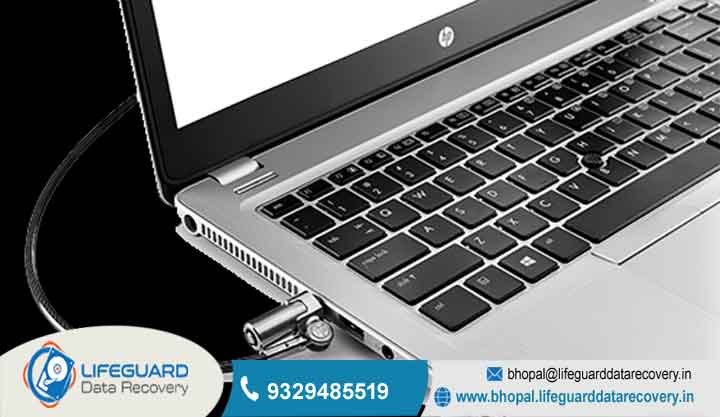
Nowadays, we work from everywhere maybe a nice cafe in MP Nagar or a busy shared office in Arera Hills. Because of this, learning how to protect laptop from theft is really the first thing you should do to keep your company
secrets safe. Losing a laptop is bad for your wallet, sure, but it’s even worse if a stranger gets into your private client files or company network. At Lifeguard datarecovery we see people coming into our Bhopal lab every day after their laptop is gone.
Many realize too late they didn’t really have a plan for how to protect laptop from theft, and then their data is lost forever. By using a mix of physical locks and some smart digital tracking, you can make sure you aren’t an easy target.
Even if the hardware disappears, your info stays locked up tight.
Why People in Bhopal Trust Lifeguard
Your Local Partner for Security and Data Help
Lifeguard is the name people in Madhya Pradesh go to when things get serious. Our “Expert Engineers” know that being safe is about more than just one thing.
From our “Secure Lab” here in Bhopal, we offer “100% Confidential” help to fix hardware and security mess-ups. We don’t just fix computers; we keep your business running.
Physical Locks: Keeping Your Gear on the Desk
The Best Laptop Cable Locks to Use in 2026
A good old physical lock is still one of the best ways to stop someone from just grabbing your laptop and running. High-quality cables from names like Kensington or Noble are like a tough steel leash for your computer.
Since laptops are getting so thin these days, these locks are specially made to fit those tiny security slots on modern workstations.Having a pro-grade lock stops that “grab-and-go” thing that happens in busy lobbies.
Even if a lock looks simple, it’s a big “stay away” sign for most thieves. For offices with lots of computers, you can even get systems where one master key opens everything, so your IT manager doesn’t go crazy with 100 different keys.
High-Tech Watching: Alarms and Alerts
Geofencing Alerts for Mobile Work Devices
Security has moved to the cloud now, so you can keep an eye on your gear in real-time. By setting up geofencing alerts for mobile work devices, your IT team gets a message the second a laptop leaves
“safe zone”like your office building or even the city limits. This way, you can act fast before the thief gets too far away.Using geofencing alerts for mobile work devices is super helpful for teams traveling around Bhopal.
If someone moves a laptop from where it’s supposed to be, the system can lock it automatically or start an alarm. It’s like an “invisible” fence that’s always working, no matter where your staff is sitting.
Managing Your Company Gear
Hardware-level GPS Tracking for Pro Laptops
If a thief is smart, they might just wipe the whole hard drive to get rid of tracking software. That’s why hardware-level GPS tracking for pro-grade laptops is so important for expensive gear.
These trackers are hidden deep inside the motherboard, so they keep sending a signal even if the thief replaces the drive or reinstalls Windows.
Having hardware-level GPS tracking for pro-grade laptops gives you a real chance to get your stuff back with the help of the police. Since the signal comes from the hardware itself, it’s almost impossible to turn off.
For firms in Bhopal handling “100% Confidential” info, this is the best way to keep track of your assets.
Safe Commuting: Staying Smart on the Move
IP Address Tracking to Find Stolen Gear
If a laptop is taken while you’re traveling, it leaves a digital footprint as soon as it touches a Wi-Fi signal. IP address tracking to locate stolen hardware helps you find the exact network or area where the laptop is being used.
This info is great for the police to track down where the stolen goods are being kept.By looking at your company VPN logs, you can use IP address tracking to locate stolen hardware to see if anyone is trying to open your files.
At Lifeguard, we help businesses look at these logs to find where the device might be. Knowing that “last seen” IP address is often the secret to getting your hardware back.
Security for Shared Offices
How to use “Find My Device” for Stolen Laptops
Most computers have built-in tools that we totally forget to turn on. Learning how to use “Find My Device” for stolen laptops is a must-have skill for everyone in the office.
If it’s turned on, you can just log in from another computer and see exactly where your machine is on a map usually it’s very accurate!
Besides just finding it, knowing how to use “Find My Device” for stolen laptops lets you make the computer beep really loud, even if it’s on silent. This is perfect for finding a laptop hidden in a big office or identifying your
machine in a crowd. It’s a free and easy step that everyone should do.
IT Help and Getting Your Data Back
Recovery for Stolen Gear You Got Back
If the police actually find your laptop, it’s usually in a bit of a mess. Thieves might have tried to delete everything or format the drive to hide what they did. Our “Secure Lab” is great at getting back “deleted data”
and fixing “corrupted files” so you can get back to work without losing everything you did.
CCTV to Keep Your Office Safe
Stopping a thief starts with them seeing a camera. We do professional CCTV setup for offices in Bhopal, so your servers and desks are always being watched. We make sure there is no “surveillance data loss,”
so if someone does break in, you have clear video to show the authorities.
Remote Data Wipe for Stolen Laptops 2026
Sometimes you just know you aren’t getting that laptop back. In that case, protecting your info is the only thing that matters. Setting up a remote data wipe for stolen laptops 2026
lets you send a “kill” signal that wipes every file and password. This makes sure your trade secrets don’t end up in the wrong hands.
A remote data wipe for stolen laptops 2026 works as soon as the thief connects to any internet. It’s the best “fail-safe” for businesses that have to follow India’s strict data laws.
Even if the laptop is gone forever, your reputation stays safe because the data is gone for good.
How we do it (The 3-Step Lifeguard Way)
1. Looking at the Digital Trail
As soon as you tell us it’s gone, our engineers check your network logs for the “last seen” spot. We look for any pings or weird login tries to see where the hardware is right now.
2. Lock it Down or Wipe it Out
If we can’t get it back, we send the remote wipe command. if there’s a chance to find it, we work with the Bhopal police to give them the tech info they need to grab the unit.
3. Fixing it Up
Once you get your gear back, we bring it to our lab. We fix any “motherboard issues” or “laptop failure” caused by the thief and bring back every bit of “deleted data” we can find.
Fixing Common Post-Theft Problems
Getting Past BIOS Locks
Thieves often put their own passwords on the hardware to lock you out. Our “Expert Engineers” can get past these locks on recovered machines so you can have your computer back.
Fixing a Disk Crash after Theft
Stolen laptops usually get bumped around a lot, which can cause a “disk crash.” We use special tools to get past the physical damage and save your “corrupted files” safely.
What Costs More Staying Safe or Fixing the Mess?
Investing in the Best Security
Spending money on good tracking or locks might seem like a lot now, but it’s way cheaper than a data breach. We give you honest advice on which tools are worth your money
so you don’t have to pay for expensive “secure recovery” later because things weren’t encrypted.
Pro Tips to Stop Data Loss
Use the Cloud
Make sure your “Expert Engineers” have your team’s laptops syncing to a safe cloud server. That way, if a laptop is snatched during lunch, the latest version of your work is still safe and ready for you on another machine.
Why We Are for Security in Bhopal
Close to the Major Business Hubs
Right in the middle of Madhya Pradesh, Lifeguard is perfectly placed to help firms in MP Nagar, Arera Hills, and the BHEL area. Being close means we can get to you fast for repairs or hardware we’re the most responsive tech team in town.
FAQS
What is the best way on how to protect laptop from theft right now?
The best way on how to protect laptop from theft is to use both a physical lock and digital tracking. Always use a cable lock in public and make sure “Find My Device” is turned on.
This way, you have a physical barrier and a way to track the machine if it ever moves without you.
How do I actually use “Find My Device” if my laptop is gone?
To use how to use “Find My Device” for stolen laptops, you just have to make sure it’s “On” in your settings first. If it goes missing, log into your account from any other browser to see its spot on a map.
You can also lock it or make it play a loud sound from there.
Can geofencing alerts stop an employee from taking a laptop?
Yes, geofencing alerts for mobile work devices are great for this. If a laptop goes outside the office area without permission, the IT manager gets an alert right away.
Is it worth paying for hardware-level GPS tracking?
For businesses with really sensitive info, hardware-level GPS tracking for pro-grade laptops is totally worth it. Thieves can easily bypass software tracking but hardware tracking stays active no matter what they do to the drive.
What if IP address tracking doesn’t work?
If IP address tracking to locate stolen hardware doesn’t show anything, it usually means the thief hasn’t gone online yet. You should queue up a “lock” or “wipe” command in your settings.
As soon as the laptop touches any Wi-Fi, the command will happen automatically.
Does a remote wipe work if the laptop is offline?
A remote data wipe for stolen laptops 2026 needs the internet to get the command.
Don’t Wait for a Thief Learn How to Protect Laptop from Theft Today
Every hour you wait is a risk for your business. Take the right steps to secure your office now and make sure your team is safe from theft in Madhya Pradesh.
Our “Expert Engineers” are ready to check your setup and build a security wall that keeps your gear exactly where it belongs.
Email: bhopal@lifeguarddatarecovery.in
CALL NOW : 9329485519