

laptop screen brightness problem fix
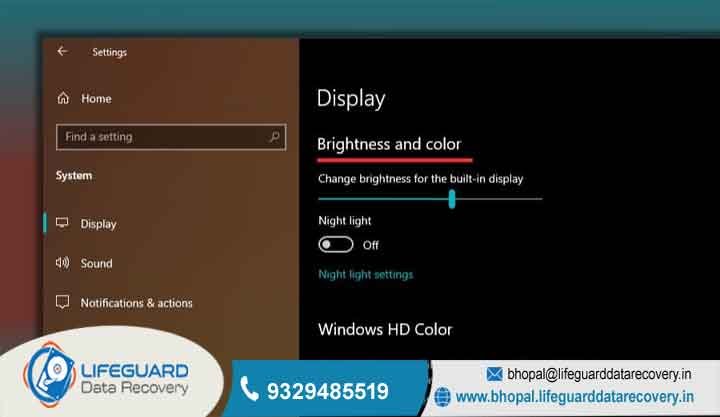
It’s really annoying when your screen is so dim that you have to squint just to read an email. If you’ve tried pressing the function buttons and nothing happens, you probably need a laptop brightness not working fix that goes deeper than just restarting your computer.
lifeguard datarecovery Sometimes it’s just a driver acting up after a Windows update, but other times the hardware inside is tired and needs professional attention. We’ve seen this a lot with office laptops around Bhopal, and we know exactly how to handle it.
Our team understands that you have deadlines and projects to finish. We don’t want you straining your eyes all day long. This thorough approach is why businesses in Madhya Pradesh trust us with their critical IT hardware.
Bhopal’s Trusted Tech Experts for Laptop Screen Too Dark Fix
We are located right here in the heart of Bhopal, so you don’t have to worry about sending your expensive laptop to some far-away city. We even have a promise. If your office laptop needs a laptop screen too dark fix, just give us a shout we can even arrange a pickup from your office or home to make it easier for you.
Comprehensive Data Recovery, CCTV, and Laptop Brightness Control Not Working Repairs
Sometimes, a laptop brightness control not working is actually a warning sign that your system files are getting corrupted. Since we’re experts at data recovery, we make sure your important business files don’t disappear while we’re fixing the hardware. Whether it’s a disk crash or a DVR failure, we’ve got the tools to save your data and fix your screen at the same time.
Solving the Screen Brightness Not Changing Laptop Issue
Have you ever had your screen get stuck at one brightness level and it just won’t move no matter what you do? This screen brightness not changing laptop problem often happens after a major Windows update. The software gets confused about which graphics driver to use. It’s a common mess, but our engineers have the right tools to reset these configurations and get your controls working again.
Technical Causes We See Every Day:
Driver Conflicts: Especially on laptops with “Dual Graphics” (Intel + Nvidia/AMD).
Generic PnP Monitor Errors: Windows sometimes forgets what your screen is and treats it like a generic plug-and-play device.
Registry Errors: Hidden settings in Windows that prevent the brightness slider from appearing.
Professional Diagnostic for Laptop Brightness Stuck Problem
When your display settings just won’t respond, it’s a laptop brightness stuck problem that usually involves the communication between the motherboard and the display panel. We offer a simple 3-step service: first, we pick it up for free in Bhopal, then our experts check it in our secure lab, and finally,
we fix it with a full guarantee. It’s easy and takes the stress off your shoulders.Most of the time, we can solve a laptop brightness stuck problem in less than 24 hours. We’ll always tell you the price upfront after the diagnostic is done, so there’s no surprises when you come to collect it. We know that for B2B clients, transparency is just as important as the repair itself.
How to Fix Dim Laptop Screen Issue (Inverter vs. Backlight)
If your laptop is a few years old, the parts inside the screen might just be wearing out from daily use. To fix dim laptop screen issue problems, our technicians look closely at the backlight or the ribbon cable (LVDS cable) connecting the screen to the base.
If you can see a very faint image on the screen when you hold a flashlight to it, but it’s otherwise black, that’s a classic hardware failure.We try to be very fair with our repairs. Instead of making you buy a whole new screen which can be expensive we try to fix dim laptop screen issue by just replacing the small broken part, like the inverter or the cable.
This saves a lot of money for our business clients who have to maintain many laptops for their staff.
Comprehensive Laptop Screen Brightness Problem Fix for Windows 10/11, Dell, HP, and Lenovo
Whether you’re using an old Windows 10 machine or a brand new Windows 11 laptop, we can provide a laptop screen brightness problem fix that works. We make sure your shortcut keys (the Fn keys) work perfectly so you can adjust your screen easily whenever the light in the room changes.
Manufacturer service centers often take weeks to reply and might even wipe your data. Our local laptop screen brightness problem fix is much faster because we are right here in Bhopal. We keep a large stock of genuine spares, so your HP, Dell, or Lenovo can be back on your desk in no time, with all your files exactly where you left them.
Avoiding Data Loss During Screen and Motherboard Repairs
Your photos and work files are the most important thing to us. Even for a simple screen fix, we are very careful. If we find that your display problem is actually because the motherboard is failing (which happens after liquid spills or power surges), we’ll help with secure recovery. We handle everything from deleted data to corrupted files on encrypted drives. At Lifeguard, we treat your data like it’s our own business on the line.
If you have a screen brightness not changing laptop error, you don’t need to go to another state. Being local means we can talk to you face-to-face and get things done way quicker than a remote support person who doesn’t understand your situation.
We’ve become the top choice for screen brightness not changing laptop repairs because we understand the local conditions here. We know how the heat and dust in Madhya Pradesh can mess with electronics, and we fix them to last against those elements.
Case Study: Resolving a Laptop Brightness Control Not Working & Data Recovery Task
A local real estate office in Bhopal recently brought us a high-end laptop because the laptop brightness control not working made it impossible for them to show house designs to their clients. After our diagnostic, we found that the graphics chip was starting to fail due to dust buildup.
We fixed the chip, got the brightness working again, and also saved all their project files that were at risk. This saved them from having to buy a new ₹80,000 laptop and losing months of work!
FAQ: Expert Answers on Fix Dim Laptop Screen Issue
Why is my laptop screen too dark fix not working after a Windows update?
This is the most common call we getWindows updates often overwrite your “good” drivers with “generic” ones that don’t know how to talk to your hardware properly. To fix dim laptop screen issue problems like this, we usually just need to roll back the drivers or install the specific manufacturer version from our verified library.
How much does a laptop screen brightness problem fix cost in Bhopal?
It really depends. If it’s a 10-minute software fix, it’s very cheap. If we have to replace an LED panel, it costs more. But don’t worry, a laptop screen brightness problem fix is almost always much cheaper than buying a whole new laptop!
Is a screen brightness not changing laptop a sign of motherboard failure?
Sometimes, yes. If your screen brightness not changing laptop doesn’t get better after we fix the software, it might be a tiny fuse on the motherboard that has blown. We have the tools to do “chip-level” repair on the board, which most shops can’t do.
How to fix dim laptop screen issue manually using the registry?
There are some tricks in the “Regedit” settings, but it’s a bit scary if you aren’t a tech person. One wrong click can make your laptop not boot at all. To fix dim laptop screen issue safely, it’s much better to let us handle it so you don’t end up with a bigger problem.
Does your service cover all of Bhopal?
Yes! We serve all areas, including MP Nagar, BHEL, Saket Nagar, and Kolar Road. We are the local experts for any laptop screen brightness problem fix.
Will I lose my data during a screen repair?
Normally, no. But we always check your drive health first. If we’re doing a laptop brightness not working fix, your data stays untouched. We are data recovery experts first, so keeping your files safe is our top priority.
Get Your Laptop Screen Too Dark Fix Today
Stop struggling with a screen you can barely see. A professional laptop screen brightness problem fix is easy and fast when you choose Lifeguard.
CALL NOW : 9329485519
Email: bhopal@lifeguarddatarecovery.in