
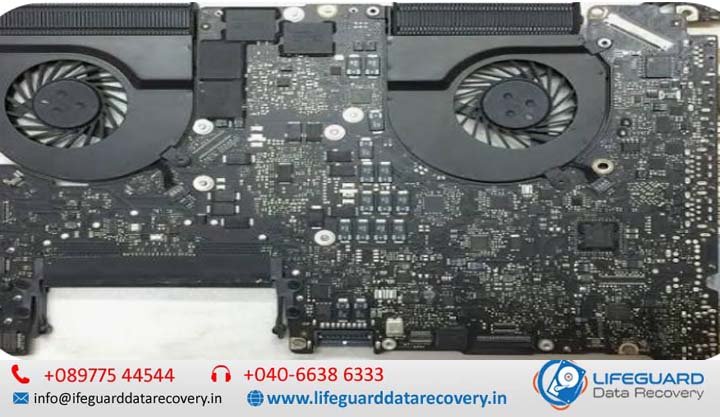
In the vast majority of cases, a MacBook logic board failure does not destroy your stored files. Your photos, documents, and system files reside on NAND flash storage chips, whereas logic board failures typically involve damaged power management components, blown capacitors, or corroded circuit traces.
While your data remains physically intact on the storage chips, a dead motherboard cuts off the power and data pathways required to read those files. To your computer, the files are not erased-they are simply trapped behind an unpowered or broken gate.
Logic Board Failure vs. Data Destruction: Inaccessible vs. Erased
Understanding whether your files are safe requires distinguishing between data inaccessibility and data destruction.
-
Inaccessible Data: The logic board cannot distribute power to the CPU, RAM, or storage controller. The device shows a black screen or zero signs of life, but the magnetic or electronic state of the flash memory cells remains unchanged.
-
Destroyed Data: High-voltage electrical surges (such as 20V leaking directly into a 0.9V NAND power rail) physically burn the silicon inside the storage chip, or severe liquid corrosion degrades the internal floating-gate transistors.
Unless a catastrophic short circuit strikes the specific power rail feeding the NAND chips, a MacBook logic board failure leaves your underlying data completely intact.
How MacBook Architecture Affects Data Safety
How easily files can be accessed after a MacBook motherboard failure depends entirely on the release year and processor architecture of your device.
| MacBook Era | Storage Architecture | Encryption Method | Recovery Approach |
| Pre-2016 (Intel) | Removable PCIe / SATA SSD | Optional FileVault (Software) | Remove SSD and connect to another Mac via external adapter. |
| 2016–2017 (Intel) | Soldered NAND Flash | Optional FileVault (Software) | Use Apple’s Lifeboat data recovery tool or board-level power repair. |
| 2018–2020 (Intel) | Soldered NAND Flash | Mandatory T2 Security Chip | Board-level micro-soldering required; T2 chip must power on to decrypt data. |
| 2020–Present (M1–M4) | Soldered NAND + System-on-Chip (SoC) | Mandatory Secure Enclave | Board-level repair required; SoC, NAND, and Secure Enclave must function together. |
On modern Apple Silicon MacBooks (M1, M2, M3, M4 series), storage chips are permanently soldered to the logic board. The controller and encryption keys are embedded directly inside the main M-series processor’s Secure Enclave. Because data is encrypted at the hardware level, you cannot simply desolder the storage chip and read it on another machine without the matching primary processor.
Common Causes of MacBook Logic Board Damage
Understanding what caused your MacBook logic board damage helps determine the probability of safely retrieving your files.
Liquid Contamination and Short Circuits
Liquid spills are the single most common cause of logic board death. When fluid contacts energized components, it creates an immediate bridge between electrical traces.
-
Data Impact: Water usually damages high-voltage lines (like the 20V USB-C power delivery line) or backlighting circuits first. Unless the liquid sits on the board for days causing deep green corrosion across the storage lines, MacBook liquid damage data recovery yields high success rates through professional cleaning and circuit restoration.
Electrical Surges and Power Management Failures
Using cheap, uncertified third-party USB-C chargers can send voltage spikes into the Power Management Integrated Circuit (PMIC).
-
Data Impact: Surges usually blow input fuses, protection diodes, or PMIC chips. These acts as “sacrificial” components, dying to protect the rest of the board—including the delicate NAND storage chips.
Diagnostics: Logic Board Damage vs. SSD Failure
Before attempting recovery, verify whether your laptop suffers from a general logic board failure or an actual storage component breakdown.
| Symptom | Primary Suspect | Can Files Be Recovered? |
| Device completely dead, no fan, no backlight, no chime | Logic Board Failure | Yes: Data is usually intact; board needs power repair. |
| Flashing folder with a question mark on boot | SSD / Firmware Failure | Conditional: Storage drive is not being detected. |
| Stuck on Apple logo with progress bar freezing at 100% | OS Corruption / NAND Read Error | Yes: Data accessible via Recovery Mode or Target Disk. |
Frequent kernel panics mentioning I/O Error |
MacBook SSD Failure | Urgent: Storage drive is actively failing. |
| Black screen, but keyboard lights up and caps lock toggles | Display / Power Rail Failure | Yes: Computer is running; external display or target mode works. |
If you encounter a MacBook black screen where the laptop seems powered but unresponsive, or if your MacBook won’t boot but files are needed, the storage drive itself is rarely the part that broke.
The Encryption Barrier: Why Chip Swapping Is Complex
A common question is whether a technician can simply unsolder a storage chip from a dead motherboard and solder it onto a working one.
Because the hardware key to decrypt your files lives exclusively inside that specific processor’s Secure Enclave, moving only the storage chip results in unreadable, encrypted gibberish. To perform a full MacBook dead motherboard data recovery via chip transplantation, a specialist must transfer the main SoC, the Secure Enclave storage, and the primary power management ICs together onto a host donor board.
Practical Pathways to Recover Data from a Dead MacBook
When facing a MacBook logic board failure, there are three primary recovery routes, ranging from built-in software tools to hardware-level micro-soldering.
Pathway 1: Share Disk Mode / Target Disk Mode
If your logic board has suffered a partial failure (e.g., display output is dead, but the main processor and power rails still function), you can mount the dead Mac as an external drive on another computer.
-
Connect the dead MacBook to a working Mac using a Thunderbolt 3/4 cable.
-
On Intel Macs: Hold down the T key while pressing the power button to enter Target Disk Mode.
-
On Apple Silicon Macs: Hold down the power button from a fully off state until “Loading startup options” appears, select Options > Continue, then choose Utilities > Share Disk.
-
If successful, the dead MacBook’s drive icon will appear on the secondary Mac’s desktop, allowing you to copy files directly.
Pathway 2: Component-Level Micro-Soldering (Board Repair)
When the computer has zero power, the most cost-effective and reliable method to recover files from a damaged MacBook is fixing the original logic board just enough to get it to boot once.
Instead of replacing the entire motherboard (which wipes user data on modern Macs), specialized technicians use schematics and boardview software to locate the exact shorted capacitor, blown diode, or corroded chip.
If you need professional assistance to revive a non-booting board for data extraction, utilize certified [MacBook logic board data recovery services] specialized in Apple hardware.
Pathway 3: Donor Board Transfer (Advanced Extraction)
If a MacBook logic board is cracked, snapped, or heavily eaten away by saltwater, repairing the original board traces becomes impossible. In these extreme cases, data recovery engineers perform a donor board swap:
-
Technicians desolder the CPU/SoC, Secure Enclave, NAND chips, and system ROM from the destroyed board.
-
These matched components are re-balled and soldered onto a known-working “donor” logic board framework.
-
The donor board is powered on, allowing immediate file extraction.
DIY Risks: What NOT to Do with a Dead Logic Board
When faced with sudden data loss, desperate users often attempt dangerous online “hacks.” These methods frequently turn a minor power issue into permanent data loss:
-
✘ The “Oven Bake” Method: Heating a logic board in a home oven to reflow solder melts delicate plastic connectors, degrades thermal pads, and causes thermal expansion that cracks internal layers of the storage chips.
-
✘ Ultrasonic Cleaning Without Board Preparation: Submerging a powered or charged board in liquids without removing battery power or properly drying it under heat drives corrosion deeper beneath the BGA (Ball Grid Array) storage chips.
-
✘ Forced Power Cycles on Wet Boards: Continuously pressing the power button or plugging in a charger after liquid damage passes 20 volts into 1-volt circuits, frying the storage chips beyond recovery.
Prevention: Safeguarding Your Files Against Future Board Failure
Because logic boards fail without advance warning, protecting your files requires automated redundancy.
-
Activate Automated Time Machine Backups: Connect an external desktop drive or Network Attached Storage (NAS). Time Machine runs background snapshots without interrupting workflow.
-
Enable iCloud Drive Desktop & Documents Sync: System Settings > [Your Name] > iCloud > Drive > Turn on “Desktop and Documents Folders.” Photos, documents, and desktop files sync continuously to the cloud.
-
Store FileVault Recovery Keys Safely: If FileVault is active, record your recovery key in a secure password manager. If your logic board dies and needs to be repaired by a lab, technicians will need this key to decrypt your files once board power is restored.
Frequently Asked Questions
Can a damaged logic board cause permanent data loss?
Yes, but only in rare scenarios. Permanent loss occurs if an electrical surge directly burns the internal silicon of the NAND storage chips, or if severe liquid corrosion permanently destroys the microscopic traces inside the storage package itself.
How do I recover photos from a dead MacBook that won’t turn on?
First, log in to iCloud.com from another device to check if your photos were synced online. If they are not synced and the Mac has no power, you will need a micro-soldering technician to repair the board’s power circuit or use a specialized data recovery service to read the files directly from the board.
Can I remove the SSD from my dead MacBook and plug it into another Mac?
Only if your MacBook was manufactured prior to 2016 (such as older MacBook Pro or MacBook Air models with removable SSD blades). On 2016 and newer models, the SSD chips are soldered directly to the motherboard and cannot be plugged into external adapters.
How much does MacBook logic board data recovery cost?
Costs vary depending on the failure type. Basic drive sharing or software extraction costs less, while board-level micro-soldering or donor board transfers requiring cleanroom environments generally range higher due to the precision labor required.