
Expert RAID 5 Data Recovery Solutions for Businesses and Individuals. RAID 5 is one of the most widely used storage configurations for businesses, organizations, and IT environments because it offers an excellent balance between storage capacity, performance, and fault tolerance.
By distributing data and parity information across multiple drives, RAID 5 allows a system to continue operating even if one hard drive fails. However, despite its built-in redundancy, RAID 5 is not immune to data loss. Multiple drive failures, controller issues, accidental deletions, firmware corruption, or improper RAID rebuilds can make valuable business data inaccessible.
At Lifeguard Data Recovery, we specialize in professional RAID 5 data recovery using advanced recovery technology, specialized RAID reconstruction techniques, and years of technical expertise. Whether your RAID array has suffered physical drive damage, logical corruption, accidental formatting, or server failure, our certified engineers provide secure, reliable, and confidential recovery services to restore your critical data.
This comprehensive guide explains how RAID 5 works, common failure scenarios, the professional recovery process, and the best practices for protecting your valuable information.
What is RAID 5?
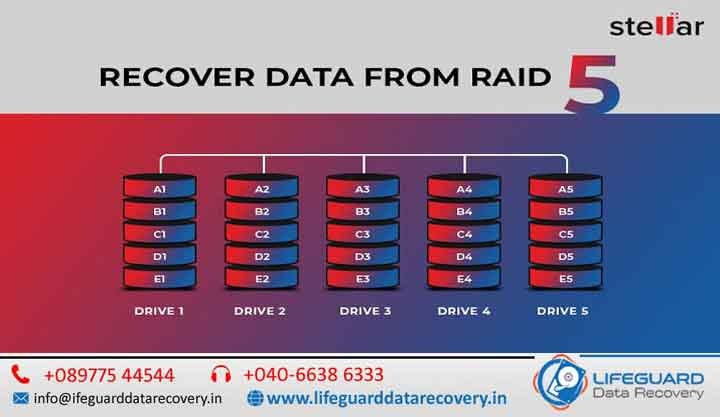
RAID 5 (Redundant Array of Independent Disks Level 5) is a storage technology that combines three or more hard drives into a single logical storage unit. Unlike traditional storage, RAID 5 distributes both data and parity information across all drives in the array.
The parity information allows the system to rebuild missing data if one drive fails, making RAID 5 an excellent solution for businesses requiring improved performance and fault tolerance.
RAID 5 is commonly used in:
- Business servers
- NAS storage systems
- Enterprise storage arrays
- Database servers
- File servers
- Video editing workstations
- Backup servers
- Virtualization environments
Although RAID 5 protects against a single drive failure, it cannot prevent every type of data loss.
Advantages of RAID 5
RAID 5 remains popular because it offers several important benefits.
Some key advantages include:
- Improved storage efficiency
- Faster read performance
- Fault tolerance against one drive failure
- Better storage utilization than RAID 1
- Cost-effective redundancy
- Suitable for business applications
- Reliable data availability
- Scalable storage capacity
These advantages make RAID 5 ideal for organizations that require both performance and reliability.
Common Causes of RAID 5 Failure
Although RAID 5 is designed to improve reliability, several factors can still lead to complete data loss.
Multiple Drive Failures
RAID 5 can survive only one failed drive. If two or more drives fail simultaneously before rebuilding is completed, the entire array may become inaccessible.
RAID Controller Failure
A damaged RAID controller can prevent the operating system from recognizing the array, making stored data inaccessible even if all drives remain healthy.
Accidental RAID Rebuild
Improper RAID rebuilds or incorrect drive replacement can overwrite parity information and significantly complicate the recovery process.
Power Surges
Unexpected power failures or electrical surges can corrupt RAID metadata and damage multiple drives simultaneously.
Firmware Corruption
Firmware problems may prevent individual drives from communicating correctly with the RAID controller, resulting in array failure.
Human Error
Accidental formatting, RAID reconfiguration, partition deletion, or incorrect BIOS settings frequently contribute to RAID data loss.
Virus and Ransomware Attacks
Malware infections can encrypt or corrupt files stored within RAID arrays, making business-critical information inaccessible.
Signs Your RAID 5 Array Has Failed
Early detection often increases recovery success.
Common warning signs include:
- RAID array appears offline
- Missing logical volumes
- Unusual clicking sounds
- Multiple failed drives
- Server unable to boot
- File system corruption
- Slow RAID performance
- Controller error messages
- RAID degraded status
- Missing shared folders
- Operating system unable to detect storage
If any of these symptoms appear, immediately stop using the RAID system and seek professional assistance.
Professional RAID 5 Data Recovery Process
Recovering data from RAID 5 requires specialized equipment, technical expertise, and a thorough understanding of RAID architecture.
Initial Diagnosis
Our engineers carefully inspect every drive to determine the exact cause of failure. We analyze physical damage, firmware condition, RAID configuration, and controller status.
Drive Imaging
Before any recovery begins, each drive is cloned sector by sector to prevent further damage. All recovery work is performed on cloned images rather than the original drives.
RAID Reconstruction
Using specialized software and hardware, our engineers identify:
- Stripe size
- Disk order
- Parity rotation
- Offset values
- Block sequence
The RAID array is then virtually reconstructed without modifying the original drives.
Data Extraction
After reconstruction, files are carefully extracted from the virtual RAID array while preserving directory structures and file integrity.
Data Verification
Recovered files are thoroughly tested to ensure documents, databases, images, videos, and virtual machines remain usable before delivery.
Devices We Support
Our RAID recovery specialists work with nearly every enterprise storage platform, including:
- Dell PowerEdge Servers
- HP ProLiant Servers
- Lenovo Servers
- IBM Servers
- Synology NAS
- QNAP NAS
- Buffalo NAS
- Promise Storage
- Drobo Storage
- Enterprise SAN Systems
- Windows Servers
- Linux Servers
- VMware Environments
Regardless of the manufacturer or RAID controller, our engineers have the expertise to recover valuable business data.
Why Professional RAID Recovery Matters
Attempting to rebuild or repair a damaged RAID array without professional guidance can permanently destroy critical information.
Professional recovery provides:
- Safe handling of failed drives
- Advanced RAID reconstruction
- Cleanroom services for physical failures
- Controller-level diagnostics
- Firmware repair
- Secure data handling
- Higher recovery success rates
For business-critical storage, professional recovery significantly reduces the risk of permanent data loss.
Tips to Prevent RAID 5 Data Loss
While no storage system is completely immune to failure, several best practices can reduce risk.
We recommend:
- Monitor RAID health regularly.
- Replace failing drives immediately.
- Maintain verified backups.
- Use an uninterruptible power supply (UPS).
- Update RAID controller firmware.
- Monitor SMART drive status.
- Test backups regularly.
- Avoid interrupting RAID rebuilds.
- Schedule preventive maintenance.
- Consult professionals before rebuilding failed arrays.
Preventive maintenance is always less expensive than emergency recovery.
Why Choose Lifeguard Data Recovery?
Lifeguard Data Recovery has earned the trust of businesses and organizations by delivering reliable RAID recovery solutions for even the most complex storage failures.
Our advantages include:
- Certified RAID recovery engineers
- Advanced enterprise recovery tools
- Cleanroom recovery facilities
- Support for all RAID levels
- Secure and confidential recovery process
- Transparent pricing
- Fast turnaround times
- High recovery success rate
- Nationwide support
- Excellent customer service
Our goal is to recover your valuable data quickly while protecting your privacy and minimizing business downtime.
Frequently Asked Questions
Can RAID 5 recover after one drive failure?
Yes. RAID 5 is designed to continue operating after one drive failure. However, immediate replacement of the failed drive is recommended.
Can RAID 5 fail completely?
Yes. Multiple drive failures, controller damage, or improper rebuilds can result in complete RAID failure.
How long does RAID recovery take?
Recovery time depends on the number of drives, storage capacity, and complexity of the failure. Most recoveries take several days, while emergency services are available for urgent cases.
Is my data kept confidential?
Absolutely. Every recovery follows strict confidentiality procedures, and customer data remains completely private throughout the recovery process.
Contact Us
If your RAID 5 storage system has failed, do not attempt DIY repairs or rebuilds, as they may permanently damage your data. Contact Lifeguard Data Recovery today for professional RAID 5 Data Recovery Services. Our certified engineers are equipped with advanced recovery technology and years of experience to recover data from failed RAID arrays, NAS devices, enterprise servers, and business storage systems. We are committed to delivering fast, secure, and reliable recovery solutions while ensuring complete confidentiality and the highest possible recovery success rate.