
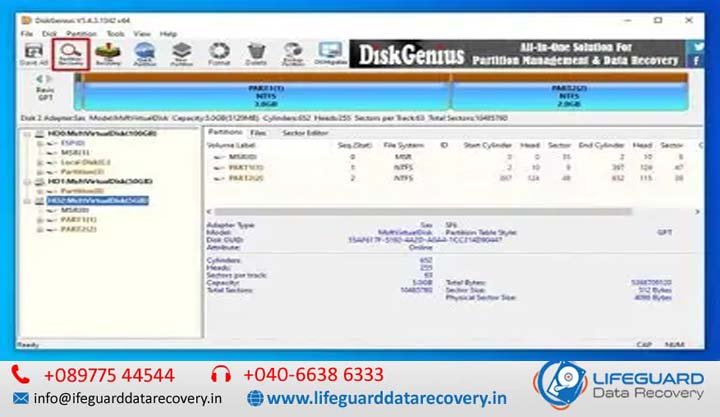
Connecting an external or internal hard drive only to be greeted by error messages like “Location is not available” or “Access is denied” can be alarming. When a drive becomes unreadable, user panic often leads to rushed decisions-such as blindly formatting the disk or running invasive utilities-that can permanently destroy recoverable files.
Navigating HDD inaccessible drive recovery in India requires distinguishing between logical structure failures and physical mechanical damage. Whether a partition suddenly vanished after a system crash, transformed into a RAW file system, or shows as unallocated space, the underlying data often remains intact on the magnetic platters.
By taking a systematic approach to diagnostics and using non-destructive recovery workflows, you can safely recover lost HDD partitions and regain access to critical personal or enterprise data.
What Is an Inaccessible HDD Partition? (Overview & File System Basics)
An inaccessible partition occurs when the operating system loses the structural map required to locate, interpret, and mount the files on a storage drive. Standard file systems-such as NTFS, FAT32, or ex FAT-rely on indexed data structures to track directory trees, file allocations, and metadata pointers.
When these pointers are corrupted, overwritten, or detached from the volume boot record, the operating system can no longer read the drive layout. Consequently, the drive may trigger an inaccessible partition recovery prompt or show up as RAW in Windows Disk Management.
Understanding MBR vs. GPT Partition Structures
To properly perform MBR partition table recovery or GPT partition table recovery, it helps to understand how these disk partitioning standards operate:
-
Master Boot Record (MBR): The traditional partitioning scheme stored in the very first sector (Sector 0) of the drive. MBR uses a 512-byte structure that includes 446 bytes of executable boot code followed by a 64-byte partition table. Because MBR lacks redundancy, any single-bit write error or bad sector in Sector 0 results in severe HDD partition table corruption, causing the entire volume layout to disappear.
-
GUID Partition Table (GPT): Part of the UEFI standard, GPT replaces legacy MBR layouts. GPT stores a Primary Partition Header at the beginning of the disk and a Secondary (Backup) Partition Header at the end of the disk. This built-in redundancy makes damaged partition table recovery on GPT disks more reliable, as diagnostic software can mirror the backup header back to the primary location if a corrupted partition table recovery process is initiated.
Causes of Partition Inaccessibility and Table Corruption
Understanding why an HDD partition disappeared or became unallocated is essential for choosing the correct recovery path and preventing future data loss.
Common Logical Causes of Hard Drive Partition Loss
Logical data loss occurs when the physical hard drive mechanism functions correctly, but the software integrity of the storage volumes is compromised:
-
Improper Drive Disconnection: Unplugging an external hard drive while Windows is actively writing to the partition table or Master File Table (MFT) leaves incomplete metadata headers.
-
Accidental Deletion & Formatting: Executing clean commands in Diskpart, deleting volume headers during OS reinstallation, or attempting a partition recovery after accidental deletion without proper backup.
-
Software Crashes and OS Conflicts: Unexpected blue screens (BSOD) or partition resizing interruptions using third-party tools can cause severe boot sector damage.
-
Malware and Ransomware Offenses: Specialized bootkit malware specifically targets Sector 0, resulting in damaged MBR recovery scenarios where boot flags are maliciously wiped or encrypted.
Hardware and Environmental Factors Unique to Indian Usage
Hard drives deployed across Indian commercial and domestic environments face environmental stresses that accelerate partition structure failures:
-
Grid Voltage Instability and Power Outages: Unscheduled load shedding and frequent power surges-particularly during monsoon seasons-cause abrupt head-parks during drive operations, triggering localized hard disk partition not showing errors due to interrupted write passes.
-
Thermal Stress in High-Ambient Climates: In regions where ambient operating temperatures exceed 40°C without controlled climate environments, prolonged thermal expansion subjects mechanical disk platters to read/write alignment errors, leading to localized bad sectors across primary partition indexes.
-
High Humidity and Contact Oxidation: High humidity accelerates oxidation on external hard drive PCB contacts, causing transient connection drops that corrupt partition mounting scripts.
Common Symptoms: How to Identify a Corrupted or Lost Partition
Recognizing primary corrupted partition table symptoms early prevents users from executing destructive actions (such as formatting or re-initializing) that overwrite salvageable data.
Error Messages: “Location Not Accessible”, “RAW File System”, and Format Prompts
When Windows encounters broken boot code or missing file allocation headers, it displays distinct operational warnings:
Disk Management Indicators: Unallocated Space and Missing Drive Letters
By opening Windows Disk Management you can visually inspect the status of an inaccessible volume:
-
Hard Drive Showing Unallocated Space: Indicates that the partition table entry defining the volume’s start, length, and boundaries has been deleted or corrupted.
-
RAW File System: The drive letter remains assigned, but Windows cannot identify the file system structure (MFT/FAT index), meaning the boot sector is unreadable.
-
Partition Not Detected in Windows: The entire disk or volume fails to register in File Explorer, though the physical drive shows as “Not Initialized” in Disk Management.
Safety Matrix: DIY Software Recovery vs. Professional Data Recovery Services
Before executing software tools to recover data from lost partition sectors, evaluate whether your drive issue is purely logical or indicates physical mechanical failure:
| Operational Metric | DIY Software Recovery | Professional Service Lab |
| Primary Failure Type | Logical corruption, accidental deletion, RAW file system. | Physical head crash, clicking noise, bad sectors, motor failure. |
| Drive Sound Profile | Smooth spinning, normal read seek sounds. | Clicking, grinding, scraping, or completely silent (stuck spindle). |
| Disk Management Status | Recognized with correct full drive capacity. | Incorrect capacity (e.g., 0 MB / 8 MB) or drive fails to initialize. |
| Data Risk Level | Moderate (Requires write-block precautions). | Zero risk to original media via hardware clone. |
| Recommended Action | Non-destructive scanning using verified utilities. | Seek hard drive partition repair services with Cleanroom facilities. |
Step-by-Step Guide: How to Fix and Recover Inaccessible HDD Partitions
Follow these sequential steps to perform hard drive partition recovery in India safely. Always ensure you are recovering files from the damaged drive onto a separate, healthy storage volume.
Step 1: Safe Diagnostics Using Windows Disk Management and Command Line
-
Press
Win + Xand select Disk Management. -
Locate the inaccessible drive and verify its assigned disk number (e.g.,
Disk 1). -
Check if the drive letter is simply missing. If the partition states “Healthy” without a letter, right-click the volume, select Change Drive Letter and Paths, and click Add to assign a new letter.
-
Open Command Prompt as Administrator (
cmd) and verify drive communication usingdiskpart
Step 2: Rebuilding Damaged MBR and Partition Boot Sectors
If your system drive fails to boot due to damaged MBR recovery requirements, boot into the Windows Recovery Environment (WinRE) using a USB installation media:
-
In the recovery environment, open Command Prompt.
-
Execute the following commands sequentially to fix the Master Boot Record and boot configuration:
-
If the boot sector of an NTFS volume is damaged, use the native
bootsectutility to rewrite the boot code.
Step 3: Utilizing Partition Recovery Tools for Logical Scans
When partition tables are completely missing, utility software can scan raw disk sectors for backup volume headers:
-
Launch an established, non-destructive partition recovery utility (e.g., TestDisk, MiniTool Partition Wizard, or EaseUS Data Recovery Wizard).
-
Select the physical hard drive displaying unallocated space and select Quick Search.
-
The tool scans the sector headers for remnant MBR/GPT structures or NTFS/FAT boot records.
-
Preview the detected lost partition map to verify directory structure integrity.
-
Select Write to restore the partition structure back to the disk’s primary sector table, or extract files directly to an external backup storage device.
Step 4: Handling Formatted or Overwritten Partition Scenarios
If you need to perform HDD partition recovery after formatting, standard partition table repair will not suffice because the format command wrote a fresh file system allocation structure over the drive.
In this scenario:
-
Perform a Deep Sector Scan or RAW Recovery pass using specialized data carving tools.
-
Data carving bypasses file system structures entirely, searching raw sectors for signature patterns (e.g., PDF headers, JPEG EXIF data, zip headers).
-
Save the recovered files to a separate physical target location.
When Logical Recovery Fails: Seeking Partition Table Recovery Services in India
If your hard drive exhibits hardware-level symptoms—such as metallic clicking sounds, high-pitched whining, or failing to register in BIOS/Disk Management—software utilities will fail and can permanently damage the drive media.
In such cases, consult an established partition table recovery services India provider equipped with certified Class 100 Cleanroom environments. Professional engineers can safely replace damaged head assembly stacks, bypass firmware corruption (such as translator module panics), and read disk platters directly using specialized hardware imagers (e.g., PC-3000).
Essential Best Practices to Prevent Partition Corruption and Data Loss
-
Deploy Uninterruptible Power Supplies (UPS): Protect desktop storage systems against abrupt power drops common across Indian power grids.
-
Practice Safe Hardware Ejection: Always use the “Safely Remove Hardware and Eject Media” tray option before disconnecting external drives.
-
Monitor S.M.A.R.T. Attributes: Track drive health using utilities like Crystal Disk Info. Pay close attention to Reallocated Sectors Count, Current Pending Sector Count, and Uncorrectable Sector Count.
-
Implement a 3-2-1 Backup Rule: Keep 3 total copies of important data across 2 different media types, with 1 copy stored securely offsite or in cloud storage.
Frequently Asked Questions
Can I recover data from an HDD showing as unallocated space without formatting?
Yes. Unallocated space simply means the operating system lacks partition table records defining the volume boundaries. By scanning the drive with partition recovery software or consulting a partition recovery specialist India provider, you can restore the partition table headers or extract files directly without formatting the drive.
Why does Windows ask to format my drive before I can use it?
Windows prompts you to format a drive when it detects a valid storage connection but cannot read the partition’s file system boot sector (a RAW file system). Windows prompts a reformat to create a new file system structure, but agreeing to this will wipe existing file index records.
What is the difference between repairing a partition table and recovering files?
Repairing a partition table edits Sector 0 / GPT structures to make the original drive volumes accessible again in File Explorer. Recovering files extracts individual data blocks from the drive and saves them onto a separate, healthy storage drive without altering the original corrupted media.
Is running CHKDSK safe on an inaccessible or corrupted partition?
No. Running chkdsk with repair flags (/f or /r) on a corrupted partition table or a physically failing drive can cause irreversible file fragmentation, as CHKDSK forcibly modifies bad sectors and orphaned file structures. Always extract your critical files or create a full disk image before considering CHKDSK repairs.
How much does professional hard drive partition recovery cost in India?
Recovery costs in India depend on whether the failure is purely logical or involves physical/firmware damage. Logical partition recovery typically ranges from ₹2,500 to ₹7,500, while physical hardware recoveries involving cleanroom interventions generally range from ₹8,500 to ₹25,000+ depending on drive capacity, replacement parts, and severity.
Conclusion: Securing Your HDD Data and Next Steps
Dealing with an inaccessible hard drive partition requires patience and systematic diagnostic troubleshooting. By prioritizing data preservation-avoiding immediate format prompts, checking physical health indicators, and choosing non-destructive recovery steps-you can safely resolve HDD partition repair India challenges and protect your valuable files.