
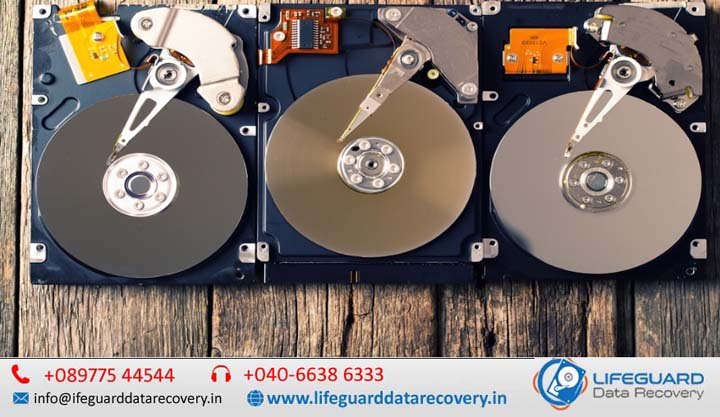
reasons hard drives fail
Mechanical hard disk drives (HDDs) remain a primary medium for high-capacity data storage, powering cloud data centers, NAS devices, and desktop backup systems. However, unlike solid-state storage, HDDs rely on ultra-precise moving mechanical components. When those mechanical or electronic systems break down, data loss is often the immediate result. Whether you are dealing with a clicking external drive or troubleshooting a slow server array, understanding why hard drives fail is the first step toward diagnosing issues, recovering files, and preventing future loss. This guide details the primary physical, electrical, and logical reasons hard drives fail, the early warning signs to monitor, and immediate action steps to protect your data. Hard Drive Lifespan: What Real-World Data Reveals A traditional HDD operates using magnetic platters spinning between 5,400 and 7,200 RPM (or up to 15,000 RPM in enterprise systems), while read/write heads hover mere nanometers above the surface on a microscopic cushion of air. Given this friction-sensitive environment, hard drive lifespan is inherently finite. According to enterprise storage telemetry analyzed across hundreds of thousands of drives by providers like Back blaze, mechanical drives follow a failure distribution model known as the Bathtub Curve: Infant Mortality (Months 1-6): A small spike in failure rates (roughly 1% to 2%) caused by manufacturing flaws, handling damage during shipping, or component assembly errors. Useful Life (Years 1-4): A period of stable operation where the annualized failure rate (AFR) hovers between 1.0% and 1.4% under controlled environment conditions. Wear-Out Phase (Year 5+): Exponentially increasing failure rates as mechanical bearings degrade, lubricant dries up, and magnetic substrate breaks down. Physical vs. Logical Failure: Knowing the Difference When analyzing hard disk failure reasons, issues fall into two broad categories: physical (hardware) failure and logical (software) failure. Failure Category Primary Root Causes Common Symptoms DIY Recoverable? Physical Failure Head crash, motor seizure, PCB burn out, dropped drive Repetitive clicking, grinding, drive not spinning, undetected by BIOS/OS No. Requires cleanroom environment & specialist equipment. Logical Failure File system corruption, accidental formatting, malware, bad sectors “Drive needs formatting” prompt, missing files, slow access times Yes. In many cases using software tools or disk rebuild commands. 8 Primary Causes of Hard Drive Failure Explained Understanding these core common hard drive failure causes helps pinpoint why a drive is failing and determines whether recovery requires professional intervention. 1. Mechanical Wear & Read/Write Head Failure The read/write head assembly is mounted on an actuator arm driven by a voice coil motor. Over millions of read/write cycles, the drive mechanism experiences wear. A head crash in hard drive hardware occurs when the slider carrying the read/write head physically strikes the spinning magnetic platter surface. Because the gap between head and platter is narrower than a single smoke particle or human hair, even micro-contaminants or mechanical slop cause the head to scrape away the magnetic coating, producing permanent data destruction. 2. Physical Shock and External Impact A dropped external hard drive or an accidental desk knock while a drive is actively spinning is one of the most frequent hard drive damage causes. Physical impacts force the delicate floating head into the platter, causing severe surface gouging and mechanical misalignment. 3. Thermal Stress & Hard Drive Overheating HDDs operate safely within an ambient thermal band of 25°C to 45°C. Excessive temperatures break down internal bearing lubricants, expand platter materials unevenly, and cause premature electronic component failure on the control board. Common causes: Blocked chassis ventilation, failed cooling fans, dust buildup, or stacking drives without adequate thermal clearance. 4. Power Surges and PCB Failure Electrical spikes—whether from lightning strikes, faulty power supply units (PSUs), or unstable mains supply—cause severe power surge hard drive damage. The printed circuit board (PCB) mounted on the exterior of the HDD controls motor speed and communications with the host computer. A surge typically destroys the Transient Voltage Suppressor (TVS) diodes or burn out the main controller chip on the PCB, leaving the drive completely unpowered and unresponsive (dead). 5. Bad Sectors and Platter Surface Degradation Hard drive platters are divided into billions of microscopic magnetic regions called sectors. Physical (Hard) Bad Sectors: Permanent magnetic substrate damage caused by head strikes, manufacturing imperfections, or aging. Logical (Soft) Bad Sectors: Sectors containing corrupted error correction codes (ECC) usually caused by unexpected power cuts mid-write. When the drive encounters bad sectors on hard drive surfaces, the OS stutters, freezes, or fails to read files stored in those addresses. 6. Firmware Corruption The HDD’s firmware sits partly on a chip on the PCB and partly on a hidden service area (SA) on the platters themselves. If firmware corruption occurs due to bad sectors in the service area or incomplete manufacturer updates, the drive cannot execute its boot sequence or map tracks, rendering it completely unreadable to the host machine. 7. File System Corruption Even when the physical drive is 100% healthy, file system corruption can make data inaccessible. Caused by improper drive ejection, sudden loss of power during file saving, or software crashes, logical corruption damages critical file allocation tables (FAT, NTFS, APFS, or EXT4), causing partition loss or raw drive errors. 8. Spindle Motor Failure The hard drive motor failure occurs when the central spindle bearing seizes due to wear, thermal expansion, or physical drop impact. When the motor seizes, the platters cannot reach operational RPM, producing a quiet high-pitched hum or buzz when power is supplied. Recognized Hard Drive Failure Symptoms Detecting early warning signs allows you to back up vital files before complete breakdown occurs. Hard Drive Clicking Noise: A distinctive rhythm known as the “Click of Death” occurs when the drive attempts to read system areas, fails due to damaged heads or corrupted service areas, and continually resets the head arm back to its resting position. Grinding or Screeching Sounds: Indicates active physical contact between the read/write head and the spinning platter surface. Power off the drive immediately. Extremely Slow Read/Write Speeds: File access times climbing dramatically, combined with system freezes during file transfer. Frequent BSODs or System Crashes: Sudden crashes occurring when