
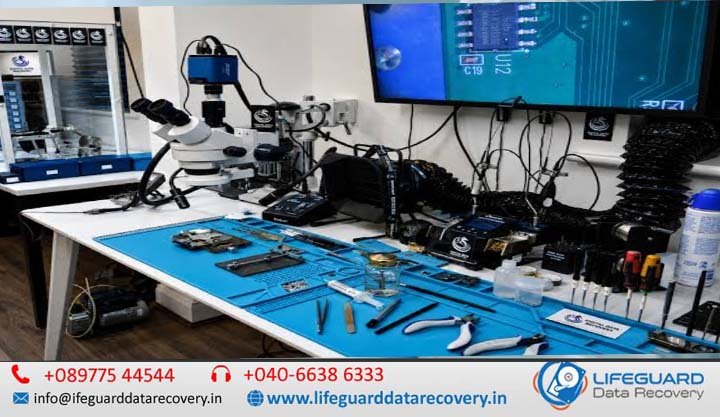
Data loss in modern enterprise and consumer environments has evolved far beyond accidental file deletions. As storage density increases, the physical and logical architectures of hard disk drives (HDDs), solid-state drives (SSDs), and redundant arrays of independent disks (RAID) have become immensely complex. When storage media suffers catastrophic mechanical breakdowns, firmware corruption, or electrical destruction, software-based recovery tools fail completely.
Evaluating an advanced data recovery laboratory India requires an understanding of technical cleanroom environments, specialized hardware workbenches, and microscopic engineering workflows. This technical guide examines how certified facilities operate, the underlying causes of complex media failure, and how hardware-level data restoration is safely executed.
Navigating Complex Data Loss in Modern Storage Systems
Modern magnetic and flash-based storage devices are engineered with extreme precision. Mechanical hard drives feature flying head heights measured in nanometers-far smaller than a single dust particle or fingerprint ridge. Solid-state drives employ multi-level flash architecture managed by complex Flash Translation Layer (FTL) algorithms.
When physical or structural failure occurs, continuing to supply power to the media frequently leads to permanent, unrecoverable data destruction. A specialized advanced data recovery lab India provides the controlled physical conditions, proprietary hardware tooling, and micro-engineering expertise necessary to bypass damaged controller layers and extract raw binary data safely.
What Defines an Advanced High-Tech Data Recovery Laboratory in India?
A true professional data recovery laboratory India is not a standard computer repair facility or local IT shop. It is an engineering facility equipped with specialized environmental controls, diagnostic hardware suites, and cryptographic security protocols designed specifically for compromised storage media.
Cleanroom Infrastructure: Class 100 / ISO 5 Standards Explained
Opening a hard disk drive outside a controlled environment immediately compromises the magnetic platters. An airborne dust particle settling on a platter acts like a boulder when the read/write head passes over it at 7,200 RPM, causing severe rotational abrasion and platter scratching.
A legitimate certified data recovery lab India operates an ISO 5 (Class 100) cleanroom or vertical laminar airflow workstation.
-
Air Purity Standard: An ISO 5 environment ensures that air contains no more than 100 particles of size 0.5 microns or larger per cubic foot of air.
-
Laminar Airflow Mechanism: Ultra-low particulate air (ULPA) or High-Efficiency Particulate Air (HEPA) filters continuously scrub ambient air, forcing a uniform stream of purified air downward over the workbench at constant velocity to push contaminants away from exposed drive platters.
-
Static Control: ESD (Electrostatic Discharge) grounded mats, ionized air blowers, and conductive wrist straps prevent static charges from frying delicate drive PCB micro-components.
For severe mechanical failures, utilizing verified cleanroom data recovery protocols is the only method to prevent immediate platter scoring during repair operations.
Specialized Hardware & Firmware Repair Tools
Standard operating systems cannot communicate with failing storage hardware because drive controllers freeze when encountering physical read errors. A high-tech data recovery laboratory relies on dedicated hardware-software suites:
-
ACE Lab PC-3000 Systems: The industry-standard diagnostic and repair ecosystem (PC-3000 Express, UDMA, Portable, and SAS) capable of communicating with storage devices in factory utility modes. It allows engineers to patch drive microcode, bypass system areas, and read drive platters directly.
-
DeepSpar Disk Imagers (DDI): Hardware-assisted drive imaging tools that bypass operating system driver layers. They manage unstable read heads, adjust time-out thresholds, and disable active background routines to build a byte-level clone without stressing damaged media.
-
Micro-Soldering Workstations: Hot-air rework stations, high-frequency oscilloscopes, and digital microscopes used for repairing burned Printed Circuit Boards (PCBs), swapping broken BIOS/ROM microchips, and performing chip-off NAND extractions.
Root Causes: When Does Data Loss Require Specialized Laboratory Recovery?
Understanding the primary physical and logical failure modes helps determine whether media requires specialized specialized data recovery services India or basic file reconstruction.
| Storage Architecture | Primary Physical/Hardware Failure Mode | Specialized Lab Recovery Technique Required |
| Mechanical HDD | Head Stack Assembly (HSA) crash, spindle motor seizure | Class 100 HSA donor swap, platter transposer swap |
| Mechanical HDD | System Area (SA) / Microcode corruption | PC-3000 SA track utility patching, translator rebuild |
| SSD / NVMe | Flash Translation Layer (FTL) corruption | Controller bypass, raw NAND chip-off extraction & descrambling |
| RAID / NAS Arrays | Multi-drive controller failure, degraded array configuration | Independent drive sector cloning, virtual RAID parameter reconstruction |
Physical and Mechanical Storage Failures
Mechanical hard drives consist of rapidly spinning aluminum or glass platters coated with a thin ferromagnetic layer. When mechanical components fail, physical intervention inside a cleanroom is mandatory.
-
Head Stack Assembly (HSA) Crash: Physical contact between the slider and the platter surface, often caused by drop impact or power surges, leading to bent slider arms or torn magnetic read elements.
-
Spindle Motor Seizure: Fluid Dynamic Bearings (FDB) lock up due to physical impact or heat overload, preventing platters from reaching operational RPM.
-
PCB Component Burnout: Transient voltage spikes destroy TVS diodes, motor controller ICs, or main controller chips, rendering the drive completely unpowered.
When a drive experiences severe hardware failure, cleanroom hard drive recovery ensures the mechanical assembly can be stabilized long enough to create a sector-by-sector clone.
Firmware Corruption & NAND Flash Controller Failures
Solid-State Drives (SSDs) contain no moving parts, but their failure modes are uniquely technical.
-
SSD Controller Lockup: When NAND flash memory cells degrade past their endurance limits, the drive controller’s internal Flash Translation Layer (FTL) becomes corrupted. The drive enters a locked state (often reporting incorrect capacity like 20MB or showing up as “Panic Mode”).
-
HDD System Area (SA) Corruption: Hard drives store critical operation parameters—such as defect lists (P-list/G-list), head alignment maps, and adaptive data—on reserved tracks of the platter known as the System Area. If SA modules become corrupted, the drive will fail to initialize or hang upon boot.
Accessing these hidden internal structures requires an expert SSD data recovery laboratory India equipped with direct memory access hardware.
Complex Logical and File System Corruption
Logical failure occurs when the physical drive functions perfectly, but the data structures stored on it become unreadable.
-
File System Metadata Destruction: Severe damage to NTFS Master File Tables (MFT), APFS B-Trees, or ext4 inodes caused by improper dismounting or power loss.
-
Formatted & Overwritten Partitions: Accidental partition initialization, volume deletion, or partial file system overwrites that require raw signature scanning and fragment carving.
Expert engineers perform advanced logical data recovery by executing deep raw signature carving algorithms across sector dumps to reconstruct damaged file structures.
Signs & Symptoms: Identifying When to Stop DIY and Consult Expert Specialists
Attempting DIY data recovery software or running system utilities on a physically damaged drive is one of the leading causes of permanent data loss. Recognized expert data recovery specialists India advise shutting down media immediately upon observing specific physical or system-level symptoms.
Physical Sound Cues
-
Clicking or Ticking (The “Click of Death”): Indicates that the drive’s read/write heads are failing to recalibrate, hitting mechanical stops, or dragging across platter tracks.
-
High-Pitched Whining or Screeching: Signifies worn or seized spindle bearings, causing physical friction.
-
Beeping Sounds: Occurs in modern 2.5-inch drives when the read/write heads park directly on the platter surface instead of the landing ramp, locking the spindle motor in place.
System & OS Detection Errors
-
Operating System Freezes on Mount: Plugging the drive causes Disk Management, macOS Disk Utility, or Linux
lsblkto hang indefinitely. -
Incorrect Capacity Reporting: An 8TB drive suddenly identifies as 0 Bytes, 20MB, or displays random non-standard characters in BIOS.
When these symptoms appear, continuing software-level attempts will exacerbate hardware degradation. Seek professional hard drive recovery India services immediately.
Step-by-Step Solutions: How a Professional Data Recovery Laboratory Operates
A transparent, engineering-focused data recovery laboratory in India follows a strict, step-by-step diagnostic and extraction workflow to protect client media integrity.
Stage 1: Non-Invasive Media Diagnostics & Sector-by-Sector Cloning
Engineers evaluate current draw, check head resistance, analyze SMART parameters, and attempt to read the System Area.
If the drive can communicate safely, engineers create a byte-level, sector-by-sector clone on target destination drives.
Stage 2: Cleanroom Mechanical Micro-Surgery
If mechanical failure is diagnosed during Stage 1, the drive is transferred into an ISO 5 cleanroom.
-
Donor Matching: Engineers locate an exact donor drive matching model, firmware revision, microcode batch, and head map parameters.
-
Head Stack Replacement: Using specialized micro-gantry tools and head combs, engineers remove the damaged hard drive head replacement assembly without allowing the individual read slider heads to touch one another.
Stage 3: NAND Chip-Off Extraction and Flash Memory Reconstruction
For damaged SSDs, flash drives, or microSD cards where the main controller IC is dead:
-
Desoldering: Engineers desolder individual Surface Mount Device (SMD) TSOP or BGA NAND flash memory chips from the PCB using temperature-controlled hot-air rework stations.
-
Algorithm Reconstruction: Because raw NAND dumps lack file structure, engineers manually reverse-engineer the original controller’s ECC (Error Correction Code), XOR scrambler keys, block interleaving, and wear-leveling translation algorithms to assemble a usable logical disk image.
Stage 4: Logical Reassembly, File System Repair, and Data Verification
Once a complete sector map or image is obtained:
-
Virtual File Tree Rebuilding: Specialized raw recovery utilities parse damaged MFT or inode tables to rebuild original directory trees, folder structures, and file names.
-
File Integrity Checking: Critical databases (SQL, PST/OST), media files, and documents are verified using internal file structure parsers.
Pre-Lab Best Practices & Prevention: Protecting Storage Media Before Diagnostics
When storage hardware fails, the actions taken in the first 30 minutes dictate whether data can be recovered. Partnering with a reliable data recovery company India involves proper pre-lab preparation.
Fatal DIY Mistakes That Cause Permanent Platter & Flash Destruction
To preserve your recovery chances, avoid these widespread technical fallacies:
-
DO NOT Open the Hard Drive Casing: Opening a drive outside a certified cleanroom floods the magnetic platters with microscopic airborne dust. Spinning an open drive instantly destroys the platter surfaces.
-
DO NOT Use the “Freezer Trick”: Storing a failing hard drive in a freezer creates internal condensation when brought back to room temperature. Moisture destroys the drive’s sensitive electronics and causes immediate magnetic layer delamination.
-
DO NOT Run Formatting or Repair Commands: Utilities like
chkdsk /forfsckforce the operating system to rewrite bad sector tables and relocate data blocks. On failing drives, this overwrites file system metadata with zeroes. -
DO NOT Swap PCBs Without ROM Transfer: Modern hard drives store adaptive tuning parameters on a unique ROM microchip on the PCB. Simply purchasing a matching PCB online and swapping it will not work and can cause head collisions due to mismatched adaptive settings.
Safe Storage Handling, Anti-Static Packaging, and Transport Protocols
When shipping damaged storage media to a secure data recovery India laboratory, ensure proper physical protection:
-
Anti-Static Shielding: Place the drive inside an Anti-Static ESD bag to protect delicate micro-controller circuits from static discharge during transit.
-
Shock-Absorbent Padding: Wrap the media in at least 3 to 4 inches of dense bubble wrap on all sides. Do not use loose packing peanuts, as media can migrate to the box edges during transport.
-
Rigid Outer Packaging: Place the wrapped media inside a sturdy corrugated cardboard shipping container, clearly marking it as “FRAGILE – SENSITIVE ELECTRONICS.”
Frequently Asked Questions (FAQs)
What is the difference between software-based recovery and cleanroom lab recovery?
Software-based recovery works strictly on logically damaged, physically functional drives that can successfully communicate with an operating system controller. Cleanroom lab recovery involves hardware micro-surgery, physical component replacement (such as head swaps), micro-soldering, or firmware patching required when storage hardware is physically broken, non-responsive, or making mechanical noises.
Why is a Class 100 cleanroom mandatory for opening damaged hard drives?
Hard drive read/write heads fly above spinning platters at distances as low as 5 nanometers. A single dust particle (which averages 30 to 50 microns in diameter) is thousands of times larger than the flying height. Opening a drive in non-cleanroom air allows dust to land on the platter, which immediately scrapes away the magnetic storage media when the drive spins up.
Can data be recovered from a severely burnt, flooded, or physically cracked drive?
Yes, in many cases. Water damage and fire damage primarily affect the drive chassis, PCB, and external housing. As long as the internal magnetic platters or flash memory chips remain structurally intact (unbroken and unmelted), engineers can clean the platters inside an ISO 5 cleanroom, transplant them into a functional donor chassis, and extract the raw data.
How do specialized labs recover data from non-detectable SSDs with controller failure?
When an SSD controller fails, the drive will not mount or identify in BIOS. Advanced laboratories desolder the individual surface-mounted NAND flash memory chips from the SSD PCB, place them into dedicated chip-readers, and extract raw binary images. Engineers then manually reverse-engineer the wear-leveling algorithms to reconstruct the file system structure without needing a functional controller.
How do certified data recovery labs ensure corporate data privacy and NDA compliance?
Reputable data recovery facilities follow strict ISO 27001 data security standards. Recovery operations are performed on air-gapped workstations disconnected from public networks. Client data is stored on encrypted local storage arrays during recovery, protected by formal Non-Disclosure Agreements (NDAs), and cryptographically wiped from recovery servers following client verification.
Selecting a Reliable Data Recovery Laboratory in India
When critical corporate or personal data is lost due to hardware failure, choosing an experienced, equipped facility is the single most important decision you can make. A qualified reliable data recovery company India will maintain transparent physical infrastructure, demonstrate established firmware and hardware capabilities, and provide non-destructive diagnostic evaluations.
Avoid unverified repair shops offering low-cost software fixes for mechanical issues. Verify cleanroom certifications, request clear non-disclosure assurances, and ensure your storage device is handled by specialized engineers inside a dedicated advanced data recovery laboratory India.