
When a sudden power surge hits your setup, your hard drive can instantly stop spinning, smell burnt or disappear from BIOS. Power spikes, unstable voltages, and lightning strikes can severely damage storage drives, making HDD power surge recovery in India a crucial topic for individuals and businesses alike.
This guide explores the mechanics of electrical hard drive failure, safe diagnostic steps, common power grid risks in India, and how professional data recovery labs safely retrieve your lost files.
What Happens When a Power Surge Hits Your Hard Drive?
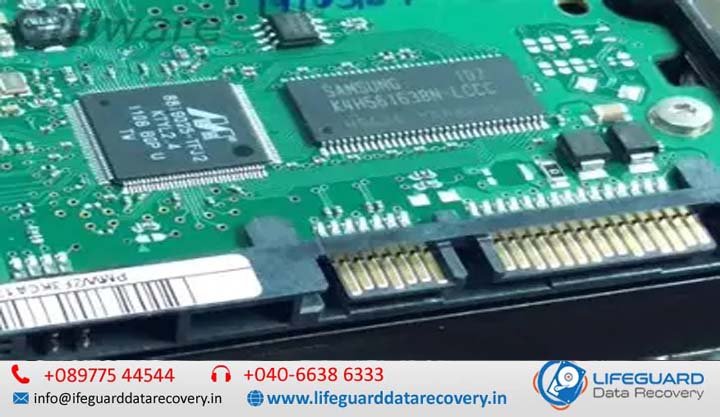
A power surge occurs when an unexpected overvoltage travels through power lines into your computer’s Switched-Mode Power Supply (SMPS) or external power adapter. Although modern power supplies feature protective capacitors, severe electrical spikes bypass these filters and reach the hard drive’s Printed Circuit Board (PCB).
When high voltage enters the hard drive’s SATA or USB power interface, it triggers protective components on the circuit board. In minor spikes, protective diodes short-circuit to blow a fuse and block high voltage from reaching the internal platters. However, severe electrical spikes can burn active chips, damage controller circuitry, or travel down internal flex cables to destroy the read/write head assembly.
Anatomy of Electrical Damage: PCB, TVS Diodes, and Controller Chips
Understanding the physical circuit board helps explain why a power-damaged drive acts dead or triggers power supply shutdowns:
-
Printed Circuit Board (PCB): The external board attached to the bottom of the hard drive that regulates power distribution, controls spindle motor speeds, and translates SATA commands.
-
TVS (Transient Voltage Suppressor) Diodes: Protective semiconductor diodes on the 5V rail (logic) and 12V rail (spindle motor). They are designed to short-circuit when incoming voltage exceeds nominal thresholds, protecting primary processing components.
-
Motor Driver IC: A specialized chip that manages the power sent to the drive’s internal spindle motor and voice coil actuator.
-
Main Controller Unit (MCU) & ROM Chip: The central microchip that executes drive firmware, along with an 8-pin Serial Peripheral Interface (SPI) flash chip storing unique drive calibration parameters.
Common Causes of Hard Drive Power Failure in Indian Infrastructure
Electrical grid conditions across Indian residential and commercial zones expose computer hardware to recurring electrical stress:
-
Unstable Voltage Fluctuations & Load Shedding: Rapid voltage drops followed by high-voltage spikes during power restoration can stress internal circuit components.
-
Neutral Cable Floating & Poor Grounding: Elevated neutral-to-earth voltage (exceeding 2–3 Volts AC) in older building setups exposes PC components to continuous electrical stress.
-
Substandard Power Supplies (SMPS) & Adapters: Low-quality desktop power supplies or uncertified external hard drive adapters lack overvoltage protection (OVP) and overcurrent protection (OCP) circuits.
-
Monsoon Storm Spikes: Lightning strikes during monsoon storms can send indirect voltage spikes through power sockets, Ethernet networks, and ungrounded UPS systems.
Key Symptoms: Identifying Power Surge Damage
-
Complete Loss of Power (HDD Not Spinning): The drive shows no signs of life, produces zero vibration, and does not spin up. This typically indicates a shorted TVS diode or blown zero-ohm resistor.
-
Burnt Odor or Scorched Marks: Scorch marks around the SATA power port or a distinct burnt epoxy smell point to overheated logic components.
-
System Power Supply Tripping: Plugging the hard drive causes the computer’s power supply to immediately shut down due to overcurrent protection detecting a dead short.
-
Rhythmic Clicking or Beeping: If the motor spins but the drive makes rhythmic clicking or electronic beeping noises, voltage may have damaged the read/write head pre-amplifier inside the sealed mechanical housing.
External vs. Internal Hard Drives: How Power Surges Affect Each
-
Internal Desktop & Laptop Hard Drives: These connect directly to the computer’s internal power supply (SATA 5V and 12V rails). A failing desktop power supply directly risks the internal drive’s main PCB logic.
-
External Desktop Drives (3.5-inch with Dedicated Power Adapter): These drives rely on external power adapters plugged directly into wall outlets. Connecting an incorrect high-voltage adapter (e.g., plugging a 19V laptop charger into a 12V enclosure) will instantly destroy the enclosure bridge board and trigger the drive’s 12V TVS diode.
-
Portable External Drives (2.5-inch USB-Powered): These drives draw power through a USB connection. Overvoltage spikes from damaged motherboard USB controllers or ungrounded front-panel USB ports can burn the integrated USB-SATA bridge board.
Step-by-Step Diagnostic & DIY Assessment: What Is Safe vs. Dangerous?
Visual Inspection
Inspect the hard drive’s PCB without unscrewing the board. Look for cracked component casings, blackened traces, or discoloration near the SATA power connection.
Testing TVS Diodes with a Multimeter
For users comfortable using basic electronics tools:
-
Set a digital multimeter to Continuity Test Mode (or Resistance set to Ohms).
-
Place the positive and negative probes on opposite ends of the 12V TVS diode (located near the 12V pin on thcontroller board inside the plastic casing rather than the internal drive itself. Safely removing the drive from its external housing and connecting it directlGet More Securityy via a native SATA cable can confirm if the internal drive is still operational.
The Truth
-
e SATA connector).
-
Repeat the measurement for the 5V TVS diode.
Isolating External Drive Enclosures
If a 3.5-inch or 2.5-inch external hard drive will not turn on, the issue may lie with the USB bridge About PCB Swapping (Why Simple Swaps Fail)
A common mistake when handling damaged hard drives is buying a donor hard drive of the same model and swapping the PCB boards directly.
On modern hard drives, a direct PCB swap will rarely work.
Modern hard drives store head alignment calibration variables, micro jog offsets, and bad sector maps inside an 8-pin ROM chip or the main MCU package.
If you attach a donor PCB without transferring the original 8-pin ROM chip using a hot-air rework station, the donor board will execute incorrect head-alignment instructions. This often causes continuous head clicking, disk errors, or permanent platter damage.
Professional Surge Recovery Process in India: What Happens in the Lab
When electrical damage extends beyond protective TVS diodes, professional data recovery labs use specialized diagnostic equipment and procedures:
-
Safe Electrical Isolation & Circuit Mapping: Technicians map the PCB circuit traces to detect short circuits before powering the board using regulated DC power supplies.
-
Micro-Soldering & ROM Chip Migration: Damaged surface-mount components are replaced under microscopic magnification. If the main MCU is fried, technicians desolder the original 8-pin ROM chip and transfer it to a donor PCB board.
-
Cleanroom Pre-Amplifier Inspection: If voltage spikes traveled down the drive’s internal flex cables, technicians inspect the head stack assembly inside a Class 100 / ISO 5 Cleanroom environment to verify the pre-amplifier chip hasn’t burned.
-
Hardware-Level Sector-by-Sector Extraction: Once the drive achieves stable safe power, technicians connect it to hardware systems like the PC-3000. These tools bypass operating system read errors, handle bad sectors, and create a mirror clone without placing write stress on the damaged drive.
Prevention Tips: Protecting Storage Drives from Electrical Spikes
-
Install a True Online UPS System: Unlike standard line-interactive UPS systems, an Online Double-Conversion UPS continuously conditions incoming AC power, delivering zero-transfer-time sine wave power to your computer.
-
Use Quality Surge Protectors: Use surge protection devices rated for high joule absorption with built-in ground indicator lights.
-
Verify Building Electrical Grounding: Ensure your electrical outlets maintain a neutral-to-earth voltage below 2 Volts AC.
-
Disconnect External Backups During Unstable Weather: Unplug external hard drives and backup arrays when not actively transferring data, especially during lightning or heavy weather conditions.
-
Maintain 3-2-1 Backups: Keep three copies of your critical data across two different storage formats, with at least one copy stored safely offsite or in the cloud.
Frequently Asked Questions (FAQs)
Q1: Can data be recovered from a hard drive that smells burnt?
Yes. In most cases, a burnt smell indicates that external PCB components, capacitors, or TVS diodes have failed. The magnetic platters storing your actual files are sealed inside a metal head-disk assembly (HDA) and usually remain untouched by external electrical shorts.
Q2: Will running data recovery software fix a power surge damaged drive?
No. Data recovery software requires your computer’s BIOS and Operating System to recognize the drive’s hardware interface. If a hard drive has experienced an electrical short, connecting it to power can cause secondary component damage or destroy the internal head pre-amplifier.
Q3: Can I swap a hard drive circuit board (PCB) at home?
Swapping a PCB board requires desoldering and transferring the unique 8-pin adaptive ROM chip from the original board onto the donor board using a precision hot-air soldering station. Performing a direct board swap without transferring the original ROM chip will cause the drive to click or fail to identify.
Q4: Are Solid State Drives (SSDs) safe from power surge damage?
No. While SSDs have no moving mechanical parts, their NAND flash controllers and Power Management Integrated Circuits (PMICs) remain sensitive to sudden overvoltage spikes.
Conclusion: Securing Your Data After an Electrical Failure
A sudden power failure or voltage spike can leave your hard drive completely unresponsive, but an electrical surge rarely destroys the data stored on the internal magnetic platters.
If your hard drive exhibits signs of electrical failure-such as no power, burnt odors, or computer PSU shutdowns-stop applying power immediately. Avoid direct board swaps without proper ROM transfer tools, and consult professional cleanroom data recovery specialists to safely extract your files.