
September 24, 2026

HDD platter damage data recovery India
Life Guard

HDD platter damage data recovery India

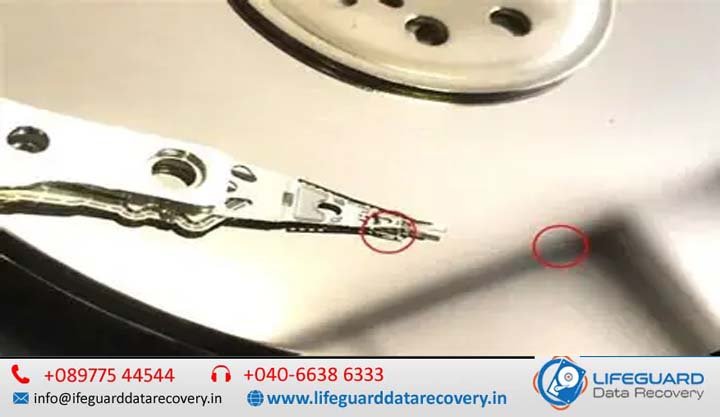
Hearing an unusual metallic grinding noise from your hard disk drive (HDD) or being told by a local technician that your drive has “scratched platters” is one of the most alarming scenarios in data storage. HDD platters hold your photos, business records, and critical databases. When their physical surface is compromised, the path to recovering your files requires specialized technical expertise. This guide provides a technical overview of HDD platter damage data recovery India, explaining the physics of platter failure, evaluating whether your data can be saved, detailing cleanroom diagnostic workflows, and helping you navigate recovery options across India. 1. Introduction: Can Data Be Saved From a Damaged HDD Platter? When a hard drive suffers physical failure, a common question arises: Can data be recovered after HDD platter damage? The short answer is yes, but with critical caveats. Unlike software-based file deletion-where data remains intact on disk sectors-physical platter damage involves surface degradation. Success depends on the severity and location of the damage, as well as how quickly the drive was powered down after the initial failure. The Anatomy of Physical Hard Drive Failures Inside a hard drive, magnetic platters spin at speeds ranging from 5,400 to 15,000 RPM. Suspended just nanometers above these platters are read/write heads mounted on an actuator arm. Because the flying height of a read/write head is thinner than a single particle of smoke or a human fingerprint, even minor mechanical shocks, electrical surges, or bearing degradation can cause the head to strike the platter. Realistic Recovery Expectations vs. Marketing Myths Many repair shops claim “100% data recovery guarantees” regardless of drive condition. In reality: Physically destroyed magnetic material cannot be read. If a head has gouged into a platter and scraped away the magnetic coating, the data stored on that specific track is gone permanently. Intact sectors remain recoverable. Hard drives contain multiple platter surfaces and tracks. Professional damaged platter data recovery India focuses on isolating damaged zones, replacing broken head stack assemblies, and imaging data from pristine platter sectors. 2. Understanding Hard Drive Platter Damage & Mechanical Mechanics To evaluate recovery options, it helps to understand the engineering behind hard disk surfaces and why traditional “repair” concepts do not apply to platter media. Platters, Magnetic Substrates, and Head Clearance Hard drive platters are constructed from high-rigidity aluminum alloys or glass-ceramic substrates. These substrates are layered with thin magnetic films: Substrate Base: Aluminum or glass core providing structural flatness. Underlayer & Magnetic Coercivity Film: Thin cobalt alloy layers storing binary bits ($0$s and $1$s) as magnetic domains. Protective Carbon Overcoat (Diamond-Like Carbon – DLC): A microscopic layer engineered to withstand minor, non-operational landing contact. Lubricant Layer: A single-molecule liquid lubricant boundary minimizing friction. When a drive operates, aerodynamic lift keeps the read/write slider floating above the lubricant layer. If this cushion fails, the slider cuts through the carbon overcoat and strips away the magnetic layer. Clarifying the Myth: Hard Disk Platter Damage Repair vs. Data Extraction A widespread misconception is that technical labs perform hard disk platter damage repair by buffing out or polishing physical scratches. 3. Primary Causes of HDD Platter Damage Platter degradation stems from acute physical trauma or gradual environmental wear. Head Crashes and Mechanical Shock Sudden movement or dropping an external hard drive while in operation forces the read/write heads to flex and strike the spinning platter. This contact gouges the media surface and bends the head suspension mechanism. Environmental Stressors: Heat, Humidity, and Contamination in Indian Climates Operating conditions across India present specific challenges for mechanical hard drives: High Ambient Moisture & Monsoons: High relative humidity can breach non-helium drive breathers over time, accelerating oxidation on internal electrical contacts and weakening the air-bearing layer. Thermal Expansion: Operating drives in poorly ventilated environments causes uneven expansion of the spindle shaft and actuator pivot, altering sub-micron head clearances. Airborne Particulates: Attempting to open a drive outside a cleanroom exposes platters to fine dust particles, causing immediate head crashes upon startup. Wear and Tear, Motor Bearing Failures, and Manufacturing Deficiencies Fluid Dynamic Bearings (FDB) inside aging hard drives gradually lose lubrication. As the spindle motor wobbles, platters rotate off-axis, forcing read/write heads to drag across the disk surface. 4. Critical Hard Drive Platter Damage Symptoms Recognizing early warning signs allows you to disconnect power before mechanical wear destroys the magnetic storage layer. Acoustic Warning Signs: Screeching, Clicking, and Grinding Noises High-Pitched Scraping or Screeching: Indicates a head slider is actively making contact with a spinning platter surface. The “Click of Death”: A rhythmic click-click-click sound produced when the actuator arm sweeps across the platter, fails to read servo positioning data due to surface damage, and strikes the mechanical stop. Buzzer/Spin-Up Stalls: Indicates the heads have landed on the platter surface outside the parking ramp and stuck to the disk (stiction), locking the spindle motor. System-Level Indicators: Freeze-ups, S.M.A.R.T. Errors, and Unrecognized Media Operating System Hangs: Connecting the drive causes File Explorer, Disk Management, or macOS Finder to freeze completely. S.M.A.R.T. Attribute Critical Warnings: Diagnostic tools report spiking values for Reallocated Sectors Count, Current Pending Sector Count, or Uncorrectable Sector Count. RAW or Zero Byte Identification: The drive appears in BIOS or System Profiler under generic factory names (e.g., “Sabre” or “DRIVE”) with 0 Bytes capacity due to damaged firmware sectors. 5. HDD Platter Scratch Recovery: Technical Feasibility Breakdown Not all platter scratches lead to total data loss. Recovery feasibility depends on the depth, direction, and location of the surface damage. Damage Classification Physical Characteristics Data Recovery Feasibility Micro-Abrasion / Hairline Scratch Microscopic surface marks caused by minor dust ingress or isolated head contact. High (80%-95%): Damaged sectors are isolated; remaining platter surface reads normally. Concentric Ring Scoring Deep, circular grooves gouged around the platter circumference by a locked head slider. Moderate to Low: Data directly inside the gouged groove is destroyed; off-track data can be extracted using head isolation. Severe Media Stripping Widespread stripping of magnetic material, resulting in fine metallic powder coating the casing interior. Unrecoverable: Floating dust destroys donor

Data recovery after storage device damage India
Life Guard

Data recovery after storage device damage India

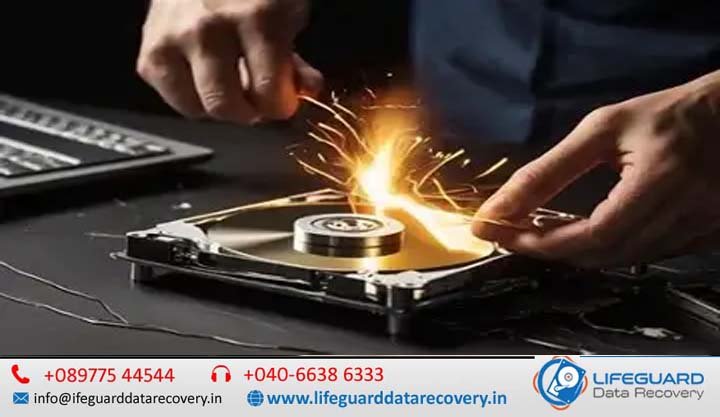
Losing access to critical files due to sudden storage media breakdown is a high-stress emergency. Whether it is an external hard drive dropped during transport, a sudden solid-state drive (SSD) failure on a workstation, or a bent USB drive holding essential business backups, hardware damage creates immediate disruption. When physical hardware fails, standard troubleshooting steps can cause further harm. Unlike logical file deletion-where data remains intact on the storage medium-physical and electrical damage compromises the underlying hardware. Attempting to force a damaged device to read data can permanently destroy the storage layers inside. 1.1 The High Stakes of Physical and Mechanical Storage Device Failure Storage devices are engineered with extreme physical and micro-electronic tolerances. Mechanical hard drives rely on nanometer-scale air cushions to float read/write heads above spinning magnetic disks, while solid-state media depend on sensitive controllers managing floating-gate NAND flash memory. Knowing what to do after storage device damage occurs is the most critical factor in determining whether your files can be retrieved. The single most important rule is immediate power termination. Continued power supply to damaged hardware risks turning a reversible failure into permanent, unrecoverable data loss. For businesses and individuals across India seeking data recovery after storage device damage India, understanding the proper diagnostic pathways protects your critical records. 1.2 What You Will Learn in This Guide This comprehensive guide provides an authoritative roadmap to navigating hardware media failures. In the following sections, you will discover: The fundamental mechanical and electronic differences between physical hardware damage and logical file system corruption. How environmental factors specific to India-such as power fluctuations, monsoon humidity, and thermal throttling-cause physical media breakdown. Diagnostic indicators across mechanical drives, solid-state drives, USB flash drives, and SD cards. Specialized hardware recovery workflows, including cleanroom surgery, SSD controller emulation, and monolithic chip-off extraction. How to evaluate certified laboratory infrastructure in India to avoid unequipped local repair shops. 2. Overview: Understanding Physical vs. Logical Storage Media Damage Understanding how to recover data from a damaged storage device begins with accurately classifying the failure mode. Storage issues generally fall into two broad domains: logical corruption and physical hardware failure. 2.1 Physical Damage vs. Logical Corruption: The Critical Difference Treating a physical hardware failure with logical software tools is one of the primary causes of permanent data destruction. Characteristic Logical Storage Corruption Physical Hardware Damage Root Cause Accidental formatting, partition table loss, malware, incomplete write cycles. Broken actuator arms, seized motors, shorted TVS diodes, cracked NAND dies. Device Detection Device enumerates correctly in BIOS / Disk Management; correct capacity displayed. Device fails to enumerate, shows 0 Bytes, hangs system bus, or clicks repeatedly. Physical Sounds Normal, smooth motor spin without abnormal mechanical sounds. Repetitive clicking, high-pitched grinding, squealing, or zero spinning motion. Safe Recovery Path Read-only software sector cloning, raw signature carving. Cleanroom micro-surgery, donor part transplants, hardware chip-off extraction. DIY Risk Level Low to Moderate (if write operations are strictly prevented). Catastrophic (powering the device accelerates physical platter/chip degradation). When performing storage device damage data recovery, establishing whether the failure is physical determines whether the device can safely remain plugged in. If physical damage is suspected, specialized Internal Service Link: data recovery from damaged storage devices must be performed using dedicated hardware imagers. 2.2 Storage Media Architectures: HDDs, SSDs, USB Drives, and Memory Cards Different storage media rely on completely different internal architectures: Hard Disk Drives (HDDs): Rely on mechanical moving parts—spinning platters, voice coil actuators, and delicate read/write heads. Solid-State Drives (SSDs): Utilize non-volatile NAND flash memory chips managed by a complex central controller running internal Flash Translation Layer (FTL) firmware. USB Flash Drives & SD Cards: Standard models feature a discrete controller and NAND chip mounted on a printed circuit board (PCB). Monolithic Flash Drives (MicroSD / Compact USBs): Integrate the controller, NAND memory, and circuit traces into a single molded epoxy package with internal copper test points. Because of these distinct designs, successful storage media data recovery India projects require specialized lab tools built for each specific hardware architecture. 3. Common Causes of Storage Device Failure and Physical Damage Storage media breakdown can stem from acute external accidents or gradual component wear. 3.1 Environmental Hazards: Power Surges, Monsoon Moisture, and Overheating In India, specific environmental conditions contribute heavily to electronic storage failure: Grid Voltage Instability & Power Surges: Frequent power cuts and voltage spikes can blow Transient Voltage Suppressor (TVS) diodes on hard drive PCBs or fry delicate power management integrated circuits (PMICs) on SSDs. Monsoon Moisture & PCB Corrosion: High relative humidity during the monsoon season leads to microscopic oxidation on exposed copper contacts, causing short circuits across power rails. Thermal Throttling & Heat Degradation: Ambient room temperatures exceeding safe operating thresholds cause thermal expansion of mechanical drive components and accelerate NAND cell wear in high-speed NVMe SSDs. Understanding these primary causes of storage device failure helps users implement proper preventive measures, such as using surge protectors and maintaining temperature-controlled environments. 3.2 Physical Impacts, Wear and Tear, and Controller Failures Mechanical and solid-state devices are also vulnerable to physical handling accidents: Shock and Deceleration (Drops): Dropping a running external hard drive forces floating read/write heads into direct contact with platters spinning at 5,400–7,200 RPM, scraping off the magnetic storage layer. Physical Connector Shear: Snapping or bending USB connectors, SATA ports, or M.2 PCB fingers breaks signal traces between the drive and the computer host interface. NAND Controller Brick/Firmware Failure: SSD controllers perform continuous wear-leveling and background garbage collection. If power is lost during a metadata update, the controller firmware can lock up, causing the drive to register as an uninitialized volume. For users handling a drop or impact, seeking specialized Internal Service Link: physically damaged storage device recovery early prevents further hardware degradation. 4. Key Signs and Symptoms of Storage Device Damage Recognizing signs of physical storage device damage allows users to halt operation before data becomes permanently unrecoverable. 4.1 Auditory and Visual Indicators Across Different Storage Media Listen and inspect carefully when connecting a storage device: Repetitive Clicking (“Click of Death”): The

HDD head crash recovery India
Life Guard

HDD head crash recovery India

Few computer errors strike as much panic into individuals and IT managers alike as a sudden mechanical hard drive failure. Among all hardware breakdowns, an HDD head crash represents the most dangerous physical threat to your stored data. Unlike software glitches or file system corruption-where files remain intact on the physical disk surface-a head crash involves a physical collision inside the drive mechanism. If your hard drive has suddenly stopped working, started making unusual noises, or disappeared from your system, understanding how physical failures occur is the first step toward recovering your critical files. 1.1 The Anatomy of an HDD Head Crash A hard disk drive operates on high-precision mechanics. Inside the sealed drive enclosure, thin magnetic platters spin at speeds ranging from 5,400 to 15,000 RPM (revolutions per minute). Suspended just nanometers above these platters are tiny read/write heads mounted on an actuator arm. During normal operation, the heads never touch the magnetic surface; they float on an air-bearing cushion created by the spinning disk. An HDD head crash occurs when this air cushion fails, causing the read/write head to make direct physical contact with the spinning platter. Because the platters rotate at massive speeds, even a fraction of a second of contact can scrape away the delicate magnetic film where your data resides. Knowing how Internal Service Link: HDD head crash recovery India works can mean the difference between complete data retrieval and permanent, unrecoverable data loss. 1.2 What You Will Learn in This Guide Navigating physical drive damage requires actionable technical knowledge, clear diagnostic checks, and an understanding of professional laboratory protocols. In this guide, you will discover: How to distinguish between minor software corruption and catastrophic physical head failure. The primary causes of mechanical breakdown in modern external and internal hard drives. Critical auditory and diagnostic symptoms, including the infamous “click of death.” Why DIY software tools and internet myths (like freezing your drive) destroy data. The exact step-by-step cleanroom surgical process used by engineering experts to replace failed read/write head assemblies. How to evaluate verified data recovery facilities across India to avoid unequipped repair shops. 2. What Is an HDD Read/Write Head Failure? To understand how data recovery engineers retrieve files from a damaged drive, you must first understand the structural role of the read/write head assembly. 2.1 Mechanical vs. Logical Hard Drive Failures When troubleshooting hard drive issues, failures fall into two distinct categories: Feature Logical Drive Failure Mechanical (Physical) Drive Failure Primary Cause Corrupted partition tables, formatted disks, malware, OS crashes. Damaged slider, broken read/write head, seized spindle motor, damaged PCB. Physical Sound Normal motor spin; smooth hum without clicking or grinding. Repetitive clicking, grinding, scraping, high-pitched squealing, or silence. Platter Condition Pristine, mirror-like magnetic coating intact. Risk of surface scoring, microscopic scratches, and magnetic dust buildup. Recovery Method Data recovery software, partition repair, hex editing. Internal Service Link: cleanroom HDD head replacement and hardware imaging. DIY Risk Level Moderate (if writing new data to the drive is avoided). Catastrophic (powering on the drive causes irreversible platter damage). If your system encounters logical corruption, software utilities can scan file sectors. However, using software on a physically damaged hard drive recovery project will continuously drag broken mechanical components across spinning platters, grinding away the magnetic storage layer. 2.2 How Read/Write Heads Hover Above Magnetic Platters The clearance between an HDD read/write head and the spinning magnetic platter is called the flying height (or cushion height). Modern hard drives maintain a flying height of approximately 3 to 5 nanometers. To put this in perspective: A human hair is approximately 80,000 nanometers thick. A fingerprint residue mark is roughly 3,000 nanometers thick. A single particle of dust is around 10,000 nanometers wide. Because the flying height is smaller than a smoke particle, any microscopic foreign object, structural misalignment, or physical shock forces the slider into the platter surface. When this happens, the slider acts like a chisel on the spinning disk, causing hard disk recovery for head failure scenarios that require professional micro-surgery. 3. Primary Causes of HDD Head Crashes While hard drives are engineered for durability, their microscopic tolerances make them susceptible to environmental and mechanical factors. 3.1 External Physical Shock & Impacts Physical impact remains the leading cause of head crashes in portable hard drives (such as 2.5-inch USB external drives) and laptops. Drop while in operation: If a drive falls while spinning, the sudden deceleration forces the actuator arm to flex, causing the heads to slap hard against the platters. Bumping during read/write cycles: Minor knocks to a laptop or external desktop drive during active file transfer can force the slider out of its stable air cushion. Transport vibration: Transporting external drives without protective padded casing can loosen internal dampeners over time. Understanding what causes HDD head crash events helps users take immediate precautions—specifically turning off the device immediately after an accidental drop—to limit further platter damage. 3.2 Wear and Tear, Power Surges, & Manufacturing Defects Not all physical failures stem from accidental dropping. Mechanical drive components degrade naturally over time: Slider Pre-Amplifier Failure: Electrical power spikes, sudden power cuts, or poor-quality power supply units (PSUs) can fry the chip mounted on the voice coil actuator arm. When the pre-amp fails, the drive can no longer read head alignment signals. Spindle Bearing Degradation: As bearings wear down over years of continuous operation, spindle wobble occurs. This slight tilt changes platter alignment relative to the heads. Thermal Stress: Inadequate system cooling causes internal components to expand unequally, altering the head stack assembly’s sub-micron alignment tolerances. 4. Recognizing the Symptoms: Is Your Hard Drive Head Failing? Early diagnosis is critical. Recognizing signs of hard drive head failure before powering the device on repeatedly can mean the difference between recovering 100% of your data or suffering total loss. 4.1 Auditory Signs: Clicking, Beeping, and Grinding Noises The human ear is often the best diagnostic tool for physical drive failures. Listen carefully for these specific sound profiles: The Repetitive “Click of Death”: A distinct click-click-click-click sound

Scroll to Top