
How Recovery Engineers Repair Damaged Storage.When a storage drive stops responding, the immediate human reaction is panic. The spreadsheet containing years of financial bookkeeping, an unbacked-up photo library, or critical enterprise databases vanish into a black screen. While consumer software tools promise quick fixes, severe storage device hardware failures require an entirely different level of intervention.
This deep dive pulls back the curtain on data recovery engineering techniques. You will learn the exact micro-surgery, electrical bypassing, and forensic software engineering that professional labs use to extract data from seemingly destroyed media.
Physical vs. Logical Failure: The First Diagnostic Crossroads
Before an engineer turns on a single soldering iron or opens a drive casing, they must determine the exact nature of the failure. Treating a physical hardware breakdown with logical software tools can permanently destroy data.
Logical Damage: Software, Corruption, and File Systems
Logical failure means the drive’s physical components work perfectly, but the data structures are compromised. This involves scrambled file systems (like NTFS, APFS, or ext4), accidental partition formatting, malware encryption, or partial file overwrites. In these scenarios, the drive reads and writes normally, but the operating system cannot locate the index markers required to piece files together.
Physical Damage: Mechanical Breakdown and Circuit Failures
Physical damage occurs when the hardware itself fails. This is a destructive state where physical components inside the drive break, warp, or burn out. Examples include a dropped external drive with broken internal components, a solid-state drive with a blown voltage regulator, or media degraded by water or fire.
Hard drive diagnostics and repair protocols dictate that a physically compromised device must never be powered on standard computer hardware, as doing so can cause permanent data obliteration.
The Data Recovery Laboratory Process: Diagnostics Under the Microscope
A reputable data recovery laboratory process follows strict forensic protocols to prevent secondary damage during evaluation.
Inside the Cleanroom: Why ISO Certified Environments Matter
When mechanical storage devices need to be opened, engineers work within a certified data recovery clean room. These environments are strictly rated under ISO 14644-1 standards. Industry leaders operate ISO Class 5 Cleanrooms, which allow fewer than 3,520 microscopic particles (0.5 micrometers or larger) per cubic meter of air.
Can damaged storage devices be repaired safely outside these environments? Absolutely not. A standard room contains millions of floating dust, skin, and fabric particles. If a single dust particle settles on a magnetic hard drive platter, the flying read/write head (which hovers a mere 5 nanometers above the surface) will hit it. This creates a head crash, scraping the magnetic coating off the platter and destroying the data forever.
The Mechanical Storage Device Repair Process (HDD)
Mechanical hard disk drives (HDDs) are marvels of high-speed micro-mechanics. When they suffer physical failure, recovery engineers perform microscopic repairs to temporarily stabilize the drive.
Replacing Damaged Read/Write Head Assemblies
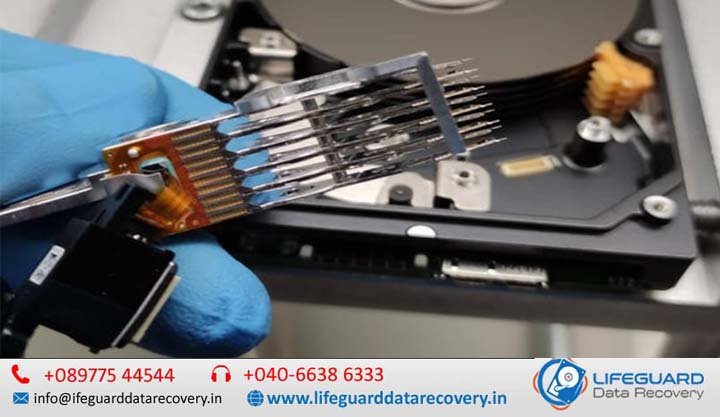
The read/write heads are the tiny electromagnets responsible for reading data off the spinning platters. If a drive is dropped or suffers a power surge, these heads can bend, snap, or “clamp” onto the platter surface (stiction).
To fix this, engineers source an identical “donor drive”-matching not just the model, but the specific manufacture date, factory site, and pre-amp chip revision. Using specialized precision tools called head replacement combs, the engineer slides the damaged head stack out and installs the donor assembly without allowing the fragile heads to touch one another or scratch the platters.
Platter Transplants and Motor Failures
Inside the HDD, a precision spindle motor spins the platters at speeds up to 15,000 RPM. If the bearings seize or the motor burns out, the platters cannot turn. Engineers resolve this by executing a platter transplant. Using a mechanical alignment jig, they extract the stack of magnetic discs simultaneously, maintaining their exact microscopic alignment relative to one another, and transfer them into a healthy donor drive chassis.
How Recovery Engineers Repair Hard Drive Electronics
A common point of failure is the Printed Circuit Board (PCB) bolted to the bottom of the drive. While old hard drives allowed you to simply swap a broken PCB with a working one, modern storage media recovery services face a much tougher hurdle.
Every modern drive feature unique adaptive calibration data stored on an EEPROM chip (or integrated into the main MCU) on the PCB. This chip contains precise alignment values unique to that single drive’s physical tolerances.
How PCB repair helps recover lost data involves desoldering this adaptive chip from the damaged board and micro-soldering it onto a compatible donor PCB. Without this specific chip transfer, a donor board will cause the drive to click and fail to initialize.
The Modern SSD Data Recovery Process
Solid-state drives (SSDs) contain no moving parts, meaning they do not require a cleanroom environment. However, the SSD data recovery process presents a highly complex electrical and mathematical challenge.
Bypassing Controller Failure via Chip-Off Techniques
The most common hardware vulnerability in an SSD is a failed Silicon Motion, Phison, or proprietary controller chip, or a shorted Power Management Integrated Circuit (PMIC). When the controller dies, the drive turns into a “brick” and cannot communicate with a computer.
To bypass this, engineers utilize an invasive data recovery engineering technique known as Chip-Off recovery.
Engineers place the SSD on a professional infrared rework station, carefully heating the board to de-solder the individual NAND flash memory chips.
Reconstructing Controller Algorithms and Wear Leveling
Reading the raw chips is only the first step. The data inside NAND flash chips is completely scrambled. To extend the life of an SSD, the controller uses a Flash Translation Layer (FTL) to constantly scatter data blocks across different chips, alongside complex Error Correction Code (ECC) calculations and XOR encryption algorithms.
Because there is no hardware controller to piece these blocks together, the recovery engineer must use specialized data recovery engineering tools (like the PC-3000 SSD framework) to reverse-engineer the original controller’s proprietary wear-leveling algorithms. They build a virtual controller in software to map the scattered blocks back into a readable, unfragmented disk image.
Advanced Storage Device Recovery: Overcoming Firmware and Encryption
Beyond mechanical and component repair lies the code level-the software running inside the storage drive hardware itself.
How Firmware Corruption Affects Storage Devices
Storage devices contain a hidden operating system known as firmware, stored within a reserved zone called the Service Area (SA) on the platters or NAND chips. This firmware manages internal operations, self-diagnostics (SMART logs), and bad-sector reallocation maps.
If the drive suffers an ungraceful shutdown or media degradation, the firmware zone can become corrupt. When this happens, the drive may report the wrong capacity (e.g., showing up as 0 GB) or identify itself by a generic factory kernel name.
Recovery engineers patch this internal code by connecting the drive to specialized hardware utilities via the factory serial interface, bypassing the standard SATA/NV Me protocols to rewrite corrupted system modules.
Decrypting Recovered Data Sectors Safely
Modern drives frequently employ full-disk encryption by default (such as Apple’s Secure Enclave on M-series chips or hardware TCG Opal protocols on enterprise SSDs).
If an Apple logic board is destroyed, engineers must carefully transplant the M-series SoC along with the paired NAND storage chips to a functional donor board. Because the encryption keys are tied directly to the physical silicon architecture, separating the chips means losing access to the data permanently.
Damaged Storage Recovery Methods: Sector-by-Sector Imaging
A critical rule of professional data recovery is that repaired hardware is never meant to return to active service. Physical repairs are temporary measures designed solely to stabilize the device for a single extraction window.
Once a drive is stabilized, engineers connect it to advanced storage device recovery hardware imagers. These devices allow granular control over read timeouts, command protocols, and head selection. If a specific head is degrading rapidly, the imager can be instructed to skip that region and map all healthy heads first. The tool creates a complete, sector-by-sector binary clone of the drive, ensuring that all subsequent data reconstruction happens safely on digital server replicas rather than the failing physical hardware.
Selecting Digital Storage Repair Solutions: What to Look For
When evaluating professional options, it is vital to distinguish between software-reliant retail stores and true engineering facilities.
| Evaluation Metric | Professional Engineering Labs | Standard Retail IT Stores |
| Environmental Control | Certified ISO Class 5 Cleanrooms | Standard open-air workbenches |
| Hardware Capabilities | Micro-soldering, Chip-Off, PC-3000 Suites | Commercial consumer software utilities |
| Firmware Modification | Direct Service Area access & module patching | Incapable of bypassing corrupt drive firmware |
| Pricing Safeguards | Strict “No Data, No Charge” verification models | Upfront diagnostic fees regardless of extraction success |
Storage Failure Prevention: Protecting Your Data Before the Crash
While professional labs have exceptional success rates, preventing physical failure remains the best defense. Use these structural steps to protect your data footprint:
-
Deploy the 3-2-1 Rule: Maintain three separate copies of your data, stored across two different types of media (e.g., an internal SSD and an external mechanical drive), with at least one copy stored completely off-site or in a secure cloud environment.
-
Monitor S.M.A.R.T. Health Attributes: Utilize diagnostic tools to check critical attributes like Reallocated Sectors Count on HDDs or Percentage Used on SSDs. Catching erratic behavior early allows you to migrate files before a hard breakdown occurs.
-
Prevent Thermal and Electrical Stress: Always eject external storage drives safely to prevent structural corruption during ongoing cache-flushing processes, and utilize high-quality surge protectors to safeguard internal drive PCBs from sudden voltage spikes.
Frequently Asked Questions (FAQ)
What happens during professional data recovery?
The journey begins with an intake process where the drive’s behavior history is logged. Engineers execute a non-destructive hardware evaluation, perform necessary mechanical or component fixes in a controlled lab space, copy the sectors to a secure image file, extract the structures, and securely deliver the verified files on a brand-new drive.
How do engineers recover files from broken hard drives without worsening the damage?
Engineers isolate the unstable drive using hardware write-blockers that prevent the host computer from writing temporary system files back to the device. They target critical files first by reading the file system metadata, ensuring the drive performs the absolute minimum amount of mechanical work required before it fails completely.
Can I repair a physically clicking hard drive at home?
No. A clicking sound indicates a mechanical failure-often the read/write heads hitting their physical limiters because they cannot read the drive’s tracking alignment marks. Opening the drive case in an uncontrolled room introduces dust contamination instantly, while running software on a clicking drive speeds up structural damage by grinding the broken head into the delicate magnetic platters.
How long does the data recovery laboratory process typically take?
A standard recovery takes anywhere from two to seven business days. The timeline is primarily determined by how difficult it is to locate compatible donor components, the physical speed at which an unstable drive reads damaged sectors, and the complexity required to manually reconstruct fragmented or corrupt file system volumes.